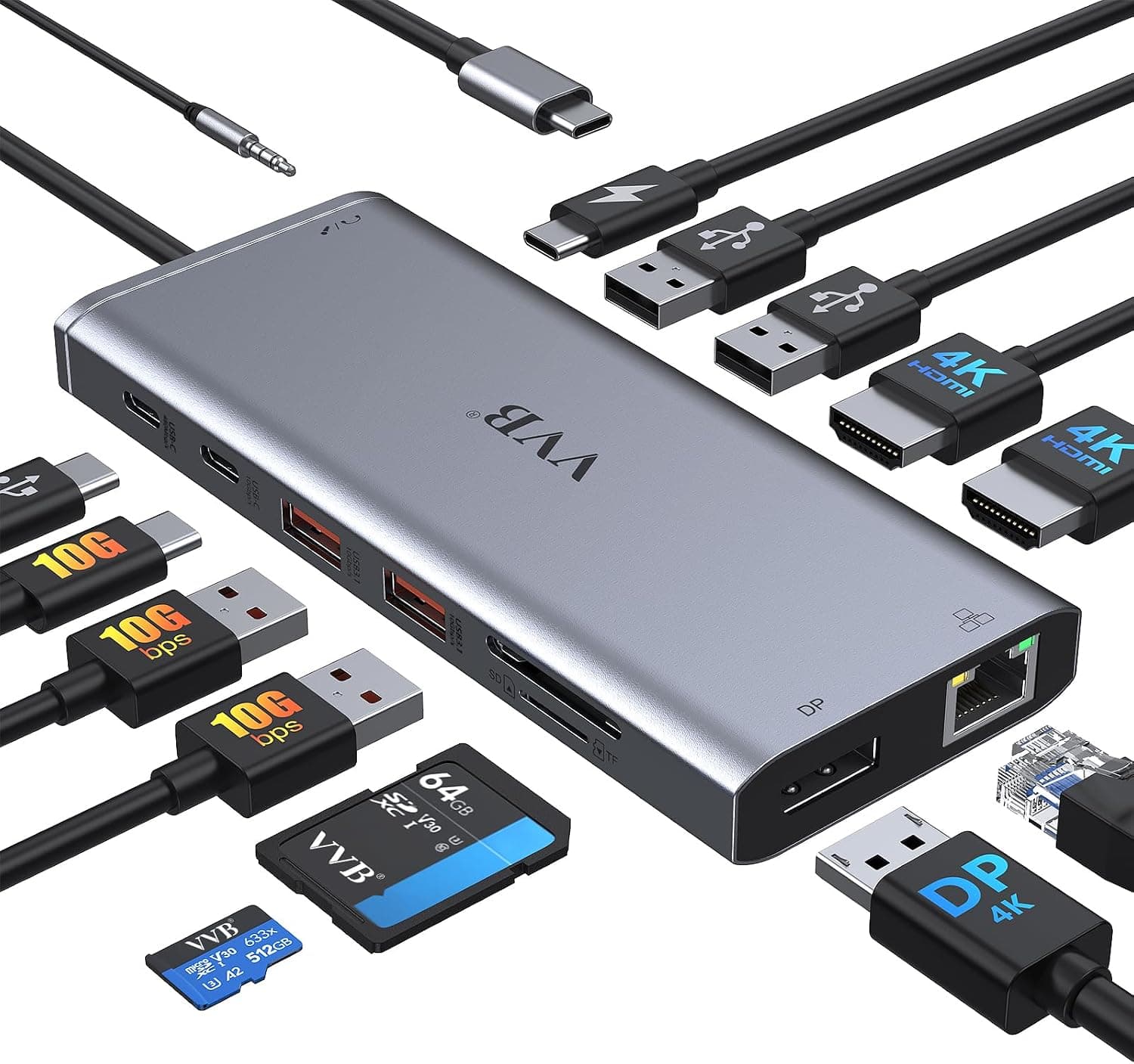
USB C Laptop Docking Station Dual Monitor HDMI USB C Hub Multiport Adapter

USB C Laptop Docking Station Dual Monitor HDMI USB C Hub Multiport Adapter

4.3 on Amazon1,844 ratingswww.amazon.com
Review reliability
85/ 100Grade A
Reviews are highly specific and balanced, almost never promotional, mostly sound authentic, and their ratings and wording agree closely, with most ratings at the top.
Affiliate link — commission is the same whatever the score.

The 30-second read

Before you decide

A starting point, not a buying verdict

What people like

Expands ports and works across laptops

Reviewers value the wide port selection (HDMI, DisplayPort, VGA, Ethernet, SD, USB-A, headphone jack) and report it works reliably across Lenovo, HP, Microsoft, and Asus laptops, with some buying a second unit.

The main watch-out

Occasional disconnects and build concerns

Some users report the monitor going black when bumped, intermittent disconnects, or the internals sliding out of the case, and one Lenovo laptop would not boot while connected.

Before you choose

Check laptop compatibility and port needs

Compatibility varies by laptop model, and some users note the dock gets warm or has a shorter cable, so confirm your specific setup and required ports before buying.

From a similar, more-reviewed product in this category: Switch 2 Dock Station for Nintendo Switch 2 Dock with 4K HDMI&Card Storage

What people like

Works as a Switch 2 dock

Several reviewers report the dock connects their Switch 2 to a TV and works with current system updates, with some noting it matches the original dock's charging.

The main watch-out

Intermittent screen flicker or disconnects

Several reviewers report the TV picture randomly flickers, black-screens, or disconnects while docked, which does not happen with the standard dock.

Before you choose

Dock only, no cables included

One reviewer notes the package contains just the dock, with no cords or cables, so you need your own HDMI and USB-C cables to connect it.

Your use case first

Your concerns

quality

Mixed experiences

28 of 128 mentions describe a negative experience (22%).

port availability

Mixed experiences

10 of 61 mentions describe a negative experience (16%).

ease of use

Mixed experiences

7 of 43 mentions describe a negative experience (16%).

functionality

Mostly positive

6 of 42 mentions describe a negative experience (14%).

reliability

Mixed experiences

87 of 252 mentions describe a negative experience (35%).

connectivity

Mixed experiences

30 of 69 mentions describe a negative experience (43%).

power supply

Mostly negative

21 of 33 mentions describe a negative experience (64%).

durability

Mostly negative

32 of 39 mentions describe a negative experience (82%).

One review can mention several topics. Percentages describe the reviews we analysed, not all buyers or the product's overall failure rate.

Compare the trade-offs

Similar products, side by side

A random selection of analyzed products from the same category. Different products are not necessarily interchangeable.

Check the evidence

What the review excerpts say

Included does not mean verified authentic. Flagged does not mean proven fake. These are analytical classifications.

Showing 3 illustrative excerpts, not the complete review set.

Included in analysis4.0/5 stars

14 Port - 2 HDMI, 1 Display Port USB-C adapter

“I'm always curious about products with no vowels in the name. This review is for the single USB-C connecting 14 port adapter. My configuration is a Legion 5i 1070i laptop with 3 external monitors. One is 27" 1080@60p HDMI, One is 1080@60p Diplay port and one is a 14" travel monitor with a USB-C video connector. That last one is using an HDMI input to USB-C output adapter to get a USB-C signal to it. (The USB-C connectors on this device DONOT carry video signal) In addition I have a microphone, keyboard and USB-C Phone (that charges at about 10 watts on one of the USB-C ports) and the 2nd USB-C is just a cable that charges or transfers data from whatever device I happen to need it for. This leaves me the 5gb and 10gb usb-A ports available. I also have a 1gb cat 5 connection and am using the headphone jack as well. Since the laptop is a gaming laptop I am forgoing the 100w power delivery port as this device is being used as a docking station when I am home and I'd rather have full power from the laptop power supply. With this configuration the monitors all power up and while it can be a little finicky (possibly because of the HDMI>USB-C adapter I am using) It does work pretty well. I can get 1080@60p to all 3 external monitors and they are all in extended mode. Network seems to be a touch slower than plugging straight into the laptop but it's not a deal breaker. I have not tried gaming on it but if I did I would plug a monitor, cat 5 and headphones straight into the laptop. The SD card reader works as it should. The audio is meh on the headphones and has an electrical pop whenever a device is connected or when the laptop boots up. Less than ideal but it's what I'd expect from a low end 14 port adapter. Ultimately it suits my needs of not having to plug and unplug 6 devices each time I leave or bring my laptop back to my home office space. It certainly runs closer to the hot side of things but not enough to burn you, not sure if using the Power Delivery would heat it up even more. It really deserves 3 stars but for the prime day price I got it for and the fact that it actually works I gave it an extra star. Not bad for a vowel-less product.”

Signals matched: Specific detail: quantity, entity, scenario · Mentions: port availability, connectivity · Reads as an authentic voice

Included in analysis5.0/5 stars

One Plug to Rule Them All (and Finally Clean Up My Desk)

“I finally got tired of playing "musical chairs" with the two USB ports on my laptop every time I sat down to work. I picked up this 14-in-1 USB-C Docking Station, and it has completely transformed my workspace from a tangled mess of wires into something that actually looks like a functional office. The "Everything Everywhere All at Once" Port Selection The sheer number of ports on this thing is impressive. I have two monitors hooked up via HDMI, my keyboard, mouse, a backup hard drive, and an Ethernet cable for a stable connection—all running through a single USB-C cable into my laptop. It even has SD card slots, which is a lifesaver for quickly moving photos and videos without hunting for a separate dongle. Performance & Setup Setup was about as "plug-and-play" as it gets. My laptop recognized both external monitors immediately, and the picture quality is crisp with no noticeable lag. The 100W Power Delivery (PD) is a huge win, too—it charges my laptop while I work, so I can leave my actual power brick tucked away in my travel bag. A Few "Pro-Tips" from My Setup: Check Your Port: Before you buy, make sure your laptop's USB-C port actually supports "DisplayPort Alt Mode" or video output. If it’s just a basic data port, the HDMI won’t work, and you’ll be left wondering why your monitors are dark. Heat: Like most high-powered hubs, it can get a little warm when you have ten things plugged in at once. It’s nothing alarming, but I’d recommend keeping it in a spot with a little airflow rather than burying it under a stack of papers. The "Screw" Factor (Again): While there aren't literal screws here, the connection is snug. Just be gentle with the main cable; since everything relies on that one plug, you want to treat it with a bit of respect. The Verdict If you’re looking to turn a single laptop into a full-blown desktop workstation with dual monitors, this is a fantastic value. It’s sturdy, reliable, and has enough ports to satisfy even the most gadget-heavy setup. My desk is finally organized, and I only have to plug in one cable to get to work.”

Signals matched: Specific detail: quantity, entity, scenario · Mentions: port availability, quality · Reads as an authentic voice

Included in analysis5.0/5 stars

bon produit

“J'utilise ce Hub USB-C pour mon ordi Asus Zenbook, c'est compatible, et fonctionne très bien. le point plus pour moi est le câble de connexion est plus souple et plus long (environ 25cm) que les standards (environ 15cm), ça me permet de laisser le Hub en dessous de mon support portable, du coup les câbles ne sont pas sur le bureau en évidence, c'est plus pratique! Par contre, j'ai essayé d'utiliser le port Type C pour alimenter le Hub, puis alimenter mon ordinateur, mais ce n'est pas assez puissant, un moment donné (environ 6h après, sachant que ma batterie a 4-5h d'autonomie) il faut alimenter. Donc Je ne pense pas que le Type C a 100W de puissance. j'ai 2 ports USB -C sur mon ordi, du coup j'ai réservé un pour l'alimentation, un pour le Hub. pas de problème. c'est un bon produit en global, je suis satisfaite ! Merci”

Signals matched: Specific detail: quantity, entity, comparison, process · Mentions: connectivity, ease of use, functionality · Reads as an authentic voice
One less thing to search

Before you buy: quick questions

Will this docking station work with my laptop?
From the manufacturer's listing

It is compatible with laptops that have a full-featured USB-C port supporting DisplayPort, charging, and data transfer, such as Thunderbolt 3/4/5 or USB-C 3.2 Gen 1/Gen 2 with Power Delivery and DisplayPort. Not all USB-C devices are compatible, and incompatible devices cannot use the HDMI, DP, or VGA ports.

Can I use it with multiple monitors?
From the manufacturer's listing

It supports dual monitors and triple displays for Windows, with single HDMI 1 or DisplayPort up to 4K@60Hz and HDMI 2 up to 4K@30Hz. MacBook laptops only support the same image on external monitors.

Does it charge my laptop while I use the other ports?
From the manufacturer's listing

Yes, it has a 100W USB-C Power Delivery port, but the safe power out is limited to 87W, and about 8W is allocated to the hub itself. A power charger and cable are not included, and at least a 65W adapter is recommended.

Do reviewers find it reliable?
From 2 kept reviews mentioning "reliability"

Experiences vary: one reviewer said it disconnects or does not work off and on and that the insides came apart, while another said bumping it can make the monitor go black for a second or two. Others reported it works well, including one who bought a second one.

Does it get hot during use?
From 5 kept reviews mentioning "quality"From the manufacturer's listing

One reviewer noted it gets a little warm, and the listing states the hub will heat up when it works, with 0℃–50℃ being the normal and reasonable range.

From a similar, more-reviewed product in this category: Switch 2 Dock Station for Nintendo Switch 2 Dock with 4K HDMI&Card Storage

Will this dock work with my original Switch, OLED, or Lite?

No — this dock is engineered **exclusively for the Nintendo Switch 2** and won't fit Switch 1, OLED, or Lite models. Many buyers on Reddit and TikTok flagged this as the #1 thing to double-check, so please confirm your console model before ordering to avoid a return.

Do I need to buy a charger and HDMI cable separately?

Yes. The package includes the dock and a user manual only — **no HDMI cable or charger**. For the best experience, pair it with a **PD 100W adapter** for fast charging and a certified HDMI 2.1 cable to unlock the full 4K@144Hz output. A lot of reviewers wished this were clearer upfront, so consider it your heads-up.

Does it really output 4K at 144Hz, and is the build quality solid?

It supports up to **4K@144Hz** (plus 8K, 1080P, and 720P), but you'll only see 144Hz if your TV/monitor and HDMI cable support it — on a standard 60Hz TV you'll get a crisp 4K/60 picture. The dock is lightweight and travel-friendly with an anti-slip base; some users note it feels lighter than the official dock, so treat it as a portable companion rather than a permanent heavy-use fixture.

Can I charge and play at the same time, and will it overheat?

Absolutely — it's built for **simultaneous play and charging**, with safety circuitry that guards against overcharging and overheating. Pair it with a 100W PD adapter for rapid top-ups. Just keep it on a hard, ventilated surface rather than a soft cushion, as you would with any dock.

What if it doesn't fit or stops working — is there a warranty and return option?

You're covered by a **12-month warranty with technical support**, and standard marketplace return/refund policies apply if it arrives faulty or incompatible. If you're unsure about fitment, verify your console is a Switch 2 first — that single check resolves most of the complaints buyers post about.

Answers are limited to the manufacturer's listing and the reviews we analysed. Questions those sources cannot support are not answered here.

Transparent by design

Understand the analysis