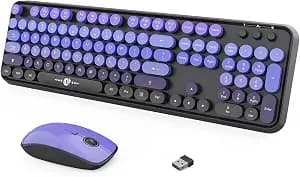
Wireless Keyboard and Mouse Combo, 104 Round Keys Cute Colorful Keyboard and Mouse with Retro Typewriter for PC Mac Laptop Tablet Computer Windows Black Purple
Description
💞【2.4GHz Wireless Technology】plug and play, 35 feet working range, 2-in-1 nano receiver, no need to install other software, no delays or Drop the line, Make your desk surface more neat and tidy, Keyboard or mouse can be used separately, just insert a single USB Receiver to use your Wireless Keyboard Mouse Combo; 💞【Wide Compatibility & Great Service】typewriter keyboard wireless and mouse combo compatible with Windows 2000 / ME / XP / 7 / 8 / 10, VISTA and Mac. Wireless keyboard brown, suitable for desktops, Chrome-book, PC, Laptop, Computer,Smart TVs and more. If you encounter any problems during use, please contact us, we will provide a satisfactory solution.; 💞【13 Multimedia Hot Keys】This cute wireless keyboard and mouse layout with numeric keypad. 13 multimedia hotkeys combined with FN provide a shortcut to your music, emails, movies, web, ect. (Note: the 12 Multimedia shortcuts are not compatible with Mac systems.; 💞【With Auto-Sleep & Saving Energy】Auto-sleep after 60-secinactivity,Work with a lower current while not in use,better saving energy and enabling a longer battery life.Press any key to reactivate the keyboard or mouse immediately.Better saving energy and enabling a longer battery life.Press any key to reactivate the keyboard or mouse immediately.; 💞【104 Keys Full Size Keyboard Design】104 keys full size keyboard, 104 large, full-size keyboards in a classic layout with an attached numeric keypad, up, down, left and right buttons for more efficient work.When you don't need use the wireless keyboard mouse set, you could choose close the switch which on the back of the device,in this way, you could saving more power.; 💞【Retro Round Keycaps & Silent Wireless Mouse】 keyboard and mouse wireless with vintage typewriter-inspired rounded keycaps, gives you the most comfortable typing experience and adds some much needed spunk to your desk.This cute mouse provides whisper-quiet clicking, don't worry about disturbing others, or causing unnecessary distracting noises.; 💞【100% Satisfactory Service】We offer a three-year worry-free warranty and a 60-day money-back guarantee in using manual and there will be a brand new one waiting for you. If you have any inquiries or concerns regarding our wireless keyboard and mouse set, please don't hesitate to contact us. Your satisfaction is our top priority
Compare the trade-offs
Similar products, side by side
A random selection of analyzed products from the same category. Different products are not necessarily interchangeable.

MOFII Wireless Bluetooth Keyboard for Laptop & Android, Connect up to 3 Devices Simultaneously, Portable 100-Key Typewriter Retro Round Keycaps Keyboard - Lipstick Colors

MOFii Wireless Computer Keyboard and Mouse Set, Colorful Full Size Keyboard with Number Pad and Silent Mouse for PC Desktop Windows (Milk Tea)

Wireless Keyboard and Mouse Combo, Ergonomic Wave Keys, Cushioned Palm Rest, Rechargeable, Phone Holder, Natural Typing, 2.4G Lag-Free, Full Size Keyboards Cordless Set for Windows/Mac -SABLUTE
One less thing to search
Before you buy: quick questions
Is this keyboard and mouse combo truly comfortable for all-day use, or is it more for looks?
Most users find the round, sculpted keys very comfortable for typing, and the overall sentiment is that it's a joy to use daily. However, a common note from social media reviews is that the matching mouse is quite small. If you have larger hands or need precise, prolonged mouse work, you might find it less ergonomic. Many happy customers use the keyboard as their primary but keep a separate, more comfortable mouse.
How loud is the "retro typewriter" typing sound? Can I use this in a shared office or library?
It produces a distinct, satisfying click-clack sound that's part of its retro charm. While not as loud as a true mechanical keyboard, it's noticeably louder than a standard silent membrane keyboard. Feedback from users in dorms and offices suggests it may disturb others in very quiet environments. If noise is a major concern, this might not be the best fit.
What's the real-world battery life, and are there any common connectivity issues?
Under normal use (a few hours per day), many users report the batteries lasting several months. For heavy, daily use with backlighting on, you may need to change them more frequently. The 2.4GHz wireless connection is generally stable. A small number of users on platforms like Reddit have mentioned occasional lag, which is often solved by using the USB extender cable to place the receiver closer to the devices, away from other USB 3.0 ports.
I love the colorful design, but will the keycap lettering wear off quickly?
The build quality is good for its price point, but some long-term users have noted that the paint on the most frequently used keys (like letters and spacebar) can show signs of wear after 6+ months of heavy, daily typing. If you're a very heavy typist, this is something to consider. For casual or moderate use, most users are satisfied with its durability.
Is this combo a good fit for me as a Mac user, and what's the return policy if it isn't?
Yes, it's fully compatible with macOS. The included keycap labels match Windows, but the `Alt` and `Windows` keys function as `Option` and `Command` on a Mac, which is standard. It's plug-and-play. If you find the sound, feel, or size isn't what you expected, we recommend checking the specific return window and policy details on the product listing page at the time of your purchase, as these can vary.
From a similar, more-reviewed product in this category: SABLUTE Wireless Keyboard and Mouse Combo, Ergonomic Wave, 30dB Quiet, MA41
Is the keyboard actually quiet when typing?
Yes. Reviewers describe the keys as whisper-quiet, silent, and not loud when typing, and the listing states typing and mouse clicks are reduced by up to 90% (30dB quiet).
How do I connect the keyboard and mouse, and what's included?
It uses a single 2.4GHz USB-A receiver that connects both devices, and a USB-C adapter is included. Reviewers report plug-and-play setup working in a couple of minutes with clear instructions, and one noted it worked immediately with a Linux machine.
What batteries does it take, and how long do they last?
The keyboard requires 2 AAA batteries and the mouse requires 1 AA battery, neither included. The listing states auto sleep technology extends battery life to 6–12 months of daily use, and reviewers report the batteries lasting a long time.
Is the wrist rest comfortable, and how is its quality?
The listing describes a 3-layer memory foam leather palm rest that provides soft cushioning and is durable and easy to clean. One reviewer found the wrist pad foam very thin and cheap-feeling, though still comfortable for the wrists, while others called the wrist rest comfy.
Is the keyboard comfortable for long typing sessions?
Yes. The listing cites an ergonomic wave design with 2 adjustable tilt angles to support natural posture and reduce fatigue, and reviewers say the wave styling is much better to type on and easier on hands and wrists.
Answers are limited to the manufacturer's listing and the reviews we analysed. Questions those sources cannot support are not answered here.
Transparent by design