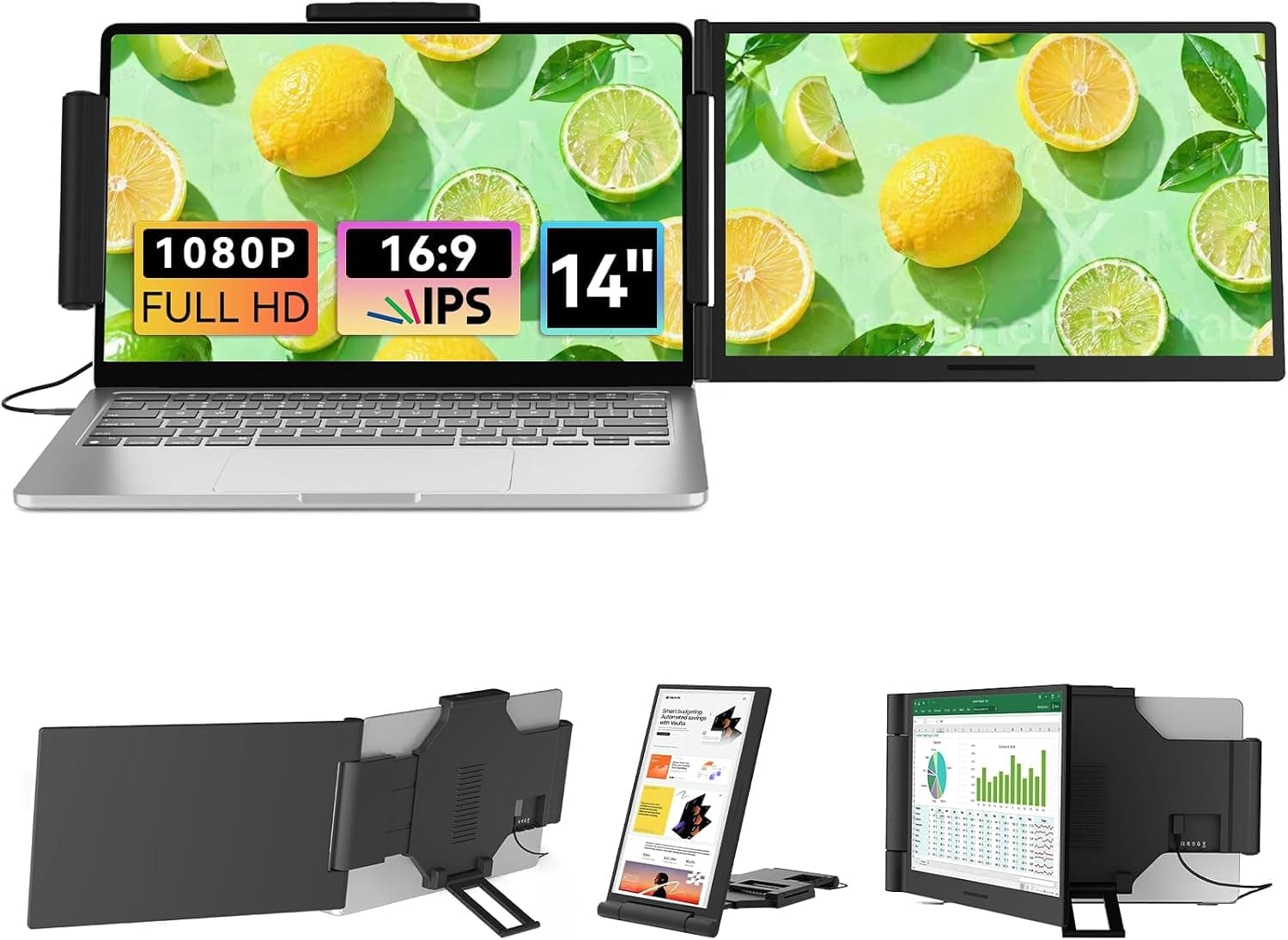
Laptop Screen Extender 14.1" 1080P, Dual Screen Monitor for Laptop 13-17.3"
購入に関する総合評価
Mostly positive, with one setup failure
Several reviewers found clear, secure extra screens easy to connect, but one older MacBook Air user could not get it working.
主な長所
- Clear, secure extra display. Several reviewers report a clear picture and a screen that fits securely on the laptop lid.
- Quick USB-C or HDMI setup. Multiple reviewers say connection and setup were quick using USB-C or HDMI.
- Portable for travel and remote work. Several reviewers describe it as slim and lightweight enough to carry for travel and remote work.
主な短所
- One reported setup failure. One reviewer with an older MacBook Air could not get it to turn on despite extra dongles and troubleshooting, and returned it.
おすすめの人
Laptop users who want an extra screen for work, travel, or remote use and can connect via USB-C or HDMI.
おすすめしない人
Buyers with an older MacBook Air or uncertain port setup, given one reported failure to power on.
商品説明
Use Anytime, Anywhere 2 Redefine Your Workflow Previous page Next page 1 Ultraslim & Portable 2 0-280° Rotation 3 Package Includes Previous page Next page 1 Full-Featured USB-C 2 Plug & Play Previous page Next page 1 Reverse Charging Mode 2 Type-C Connection 3 HDMI Connection Previous page Next page 1 Brightness Adjustment 2 Vibrant 1080P IPS
トレードオフを比較
似た商品を並べて比較
同じカテゴリの分析済み商品から無作為に選んでいます。商品が異なれば、単純に置き換えられるとは限りません。

Samsung 34" Odyssey OLED G8 (G85SD) Ultra-QWHD QD-OLED G-Sync Compatible Curved Gaming Monitor, 175Hz, 0.03ms, Glare-Free Display, AMD FreeSync Premium Pro, 3 Yr Warranty,LS34DG856SNXZA,2024

Sceptre New 22-Inch Gaming Monitor, FHD 1080p, Up to 144Hz, HDMI, DisplayPort, Built-in Speakers, Machine Black (E225W-FW144 Series, 2026)

Laptop Screen Extender, 15.6" Fhd Portable Monitor With Dual Stands
調べる手間をひとつ減らす
購入前によくある質問
Will this work with my laptop, and how do I know if my USB-C port is compatible?
It works with most laptops 13–17.3", including Windows, Mac (M1–M5), Chrome, Linux, and Android devices. The key check: if connecting via USB-C, your port must support full-featured USB-C (DisplayPort Alt Mode or Thunderbolt 3/4) — a charge-only USB-C port won't carry video. Not sure? HDMI always works as a fallback (just add a USB-A or USB-C cable for power), or contact the seller with your laptop model before buying. Many Reddit users stressed this is the #1 thing to verify first.
The screen went black or flickered — is my unit defective?
Usually not — it's almost always a power issue. Make sure the monitor receives sufficient power, especially in HDMI mode where an extra USB-A or USB-C cable is required. Then unplug and firmly reconnect all cables. TikTok reviewers frequently mention that a loose or underpowered connection causes black screens, and a quick reseat fixes it. If problems persist after trying a different port or cable, reach out for warranty support (2-year coverage).
How does it attach to my laptop, and will it fit securely without scratching?
The extender clamps onto your laptop's screen bezel with a bracket — no tools or adhesives. It fits most 13–17.3" laptops snugly, though users with very thin bezels or 17"+ screens sometimes note a slightly looser grip, so double-check your dimensions. The contact points are designed to avoid scratching; just avoid over-tightening. It's best suited to standard laptop lids rather than ultra-slim or curved designs.
Is it actually portable, and what's included in the box?
At 3.28 lbs and 14.9" wide, it's portable in the "pack it for a work trip" sense rather than "toss it in a tote" — frequent flyers on YouTube note it's a commitment, not featherweight. The box includes everything you need to start: instruction manual, USB-C to USB-C, USB-A to USB-C, HDMI to Mini-HDMI, and an HDMI adapter. Note that HDMI setups need that extra power cable, so plan for a little cable management.
Is it worth the money, and what if it doesn't work for me?
At a 4.8-star average across 331+ reviews, most buyers call it excellent value versus $300+ brand-name extenders — praising the crisp 1080p IPS panel, plug-and-play setup, and 280° rotation for coding, trading, and travel workflows. It's ideal for remote workers, students, and multi-taskers; less ideal if you need ultralight gear or have a charge-only USB-C laptop. It ships with a 2-year warranty, and returns are handled through the standard marketplace policy — so if it's not the right fit, you're covered.
同カテゴリーのレビュー数が多い類似商品より: KOORUI 24 Inch Gaming Monitor, 180Hz 1080P VA Display with 3000:1 Contrast
Does this monitor really run at 180Hz, and what do I need to enable it?
Yes — it's a native 180Hz panel, but you'll need to switch it on manually. Connect via the included HDMI cable (or a DisplayPort-capable setup), then set 180Hz in your GPU's display settings; it defaults to a lower refresh rate out of the box. Many Reddit and YouTube users note that enabling Adaptive Sync/FreeSync alongside it gives the smoothest experience, and it works with both AMD and NVIDIA cards.
How does the VA panel perform for gaming and everyday work?
The 3000:1 contrast gives noticeably deeper blacks than typical IPS budget monitors, which shines in dark game scenes and movies. For fast-paced competitive shooters, some TikTok and Reddit users mention mild ghosting/smearing in dark transitions — it's great for casual gaming, students, and office work, but color-critical creators or hardcore FPS players may prefer an IPS panel.
The stand looks basic — can I adjust the height or mount it?
Correct, the included stand only tilts (-5° to 20°) and doesn't offer height, swivel, or pivot adjustment, and a few users find the base slightly wobbly. The good news: it's VESA 100×100mm compatible, so a monitor arm or desk mount solves ergonomics entirely — a popular fix among dual-monitor and dorm-room setups.
What if I receive a unit with a dead pixel or backlight bleed?
Budget monitors can vary unit to unit, and some buyers report stuck pixels or corner bleed — but KOORUI backs it with a 3-year manufacturer warranty. If your unit arrives defective, contact the seller for a replacement or refund promptly; most users who did so report a smooth resolution, so inspect the screen within the return window.
Is it good value, and who is it best suited for?
At around $120, it's widely praised as one of the best budget 180Hz options — ideal for students, casual gamers, home-office users, and compact or dual-monitor setups. Just set expectations: no built-in speakers, a single HDMI plus VGA, and basic ergonomics. If you need height adjustment, color accuracy, or built-in audio, consider spending more on an IPS alternative.
回答はメーカーの商品情報と分析対象のレビューの範囲に限られます。これらの情報源で裏付けられない質問には回答していません。
透明性のある設計