ユーザーが気に入っている点
Clear picture and easy setup
Several reviewers praise the clear picture, easy setup, and strong value for a 1440p ultrawide gaming monitor.
購入に関する総合評価
Several reviewers praise picture, size, and value, but some report defects or connection issues.
Buyers wanting a clear, adjustable ultrawide monitor for gaming or office multitasking who can check the unit on arrival for defects.
Buyers who need reliable variable refresh rate out of the box or a strongly curved, taller screen.
30秒でわかる要点
ユーザーが気に入っている点
Several reviewers praise the clear picture, easy setup, and strong value for a 1440p ultrawide gaming monitor.
主な注意点
Two reviewers received faulty units, citing a DisplayPort screen issue and VRR not working; one had to seek a fix.
選ぶ前に
One reviewer found the 34-inch ultrawide lacks height compared with a good 32-inch monitor, despite the extra width.
同カテゴリーのレビュー数が多い類似商品より: KOORUI 24 Inch Gaming Monitor, 180Hz 1080P VA Display with 3000:1 Contrast
ユーザーが気に入っている点
Several reviewers describe the monitor as a strong budget purchase, citing impressive specs for the money and satisfaction with gaming use.
主な注意点
Several reviewers report the monitor failing or coming apart after months to a couple of years, including a dead screen and a failing power cord.
選ぶ前に
Two reviewers note that setup benefits from adjusting settings in your GPU software, including color, brightness, and VRR.
商品説明
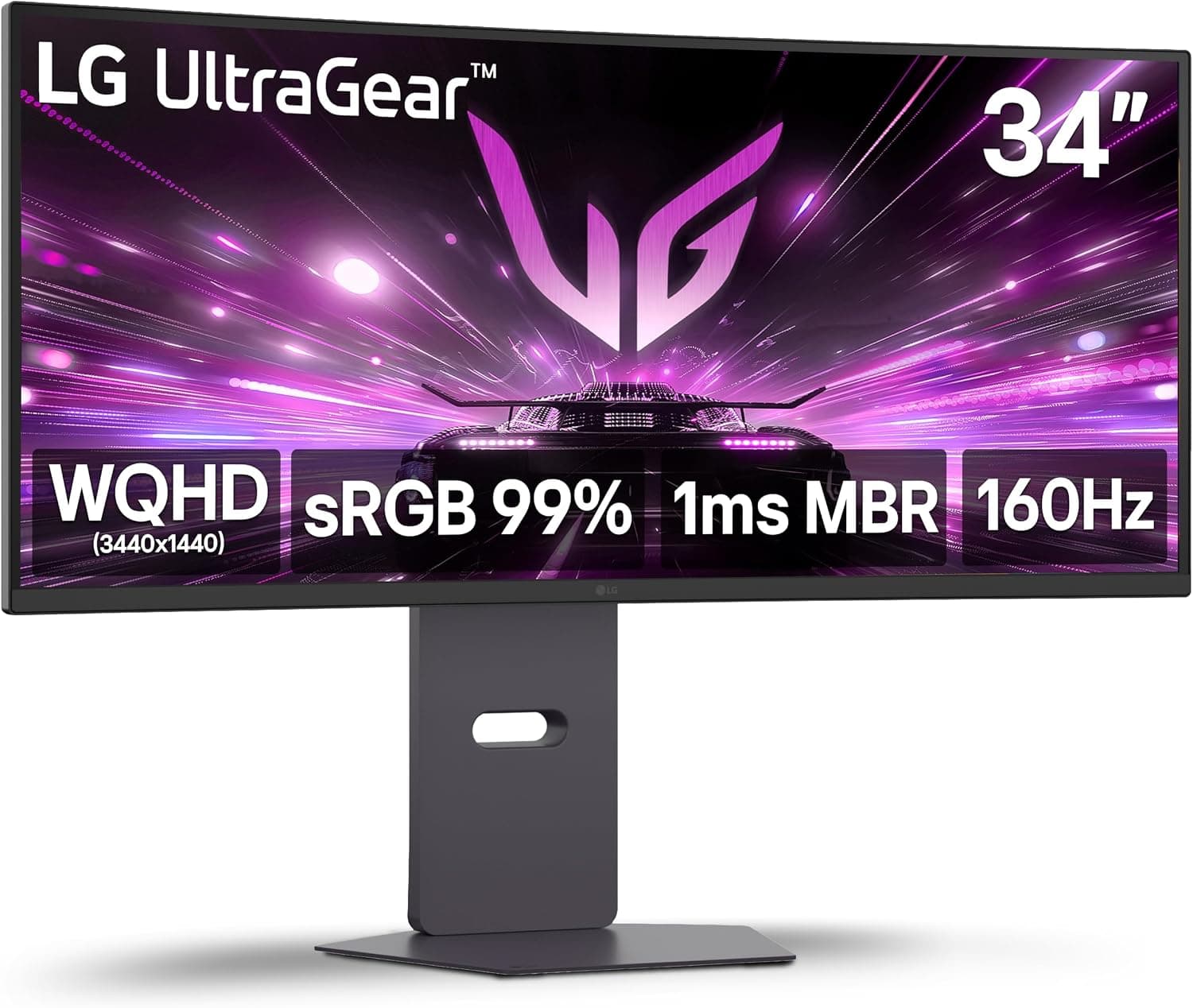
Experience expansive, responsive gameplay with the LG UltraGear 34G600A-B gaming monitor. This 34" curved WQHD (3440x1440) display wraps you in the action with a cinematic 21:9 aspect ratio and immersive 1800R curvature. Designed for gamers who demand speed and clarity, the monitor delivers a 160Hz refresh rate and 1ms MBR (Motion Blur Reduction) time for smooth, virtually blur-free visuals. HDR10 and up to 99% sRGB color coverage bring out vibrant details in every scene, whether you're exploring open worlds or battling in fast-paced arenas. AMD FreeSync Premium minimizes tearing and stutter, while Black Stabilizer, Crosshair, and Dynamic Action Sync (DAS) give you a competitive edge. An adjustable stand with tilt, height, and swivel options helps you find your optimal setup. Plus, built-in speakers with MaxxAudio complete the setup with powerful sound. Whether you're gaming or multitasking, this UltraGear monitor delivers the speed, color, and comfort you need to stay locked in.
トレードオフを比較
同じカテゴリの分析済み商品から無作為に選んでいます。商品が異なれば、単純に置き換えられるとは限りません。

Sceptre IPS 27 Inch 2K 2560 x 1440p QHD 75Hz DisplayPort HDMI 99% sRGB Build-in Speakers Machine Black (E275W-QPT)

LG 34U60ZB-B 34-inch UltraWide WQHD 120Hz HDR10 1800R Curved Monitor, Black

Samsung 34" Odyssey OLED G8 (G85SD) Ultra-QWHD QD-OLED G-Sync Compatible Curved Gaming Monitor, 175Hz, 0.03ms, Glare-Free Display, AMD FreeSync Premium Pro, 3 Yr Warranty,LS34DG856SNXZA,2024
根拠を確認する
「分析対象」は真正性が確認されたことを意味しません。「フラグ付き」も捏造と証明されたことを意味しません。いずれも分析上の分類です。
参考として3件の抜粋を表示しています。レビュー全体ではありません。
Overall, disappointing.
“The stand itself is great. It's the same one that comes on Ultragear high end monitors. I'm not a huge fan of the 34" ultrawide in general. It's plenty wide but the height is lacking especially compared to a good 32" monitor. The power plug is aggravating. It's quite large and has a large, round center pin. This made it very difficult for me to plug in to my surge protector. In fact I had to use an adapter to get the monitor plugged in and running. The real deal breaker though is the image quality. Colors are somewhat washed out and the brightness especially with whiteness is lacking. This one will be going back.”
検出されたシグナル:具体的な記述:comparison, quantity, entity · 実体験に基づく自然な文章
AWESOME ASF
“Got this for my boyfriend who’s a streamer, this monitor is fizzy fire according to my boyfriend. It’s adjustable at the base and you can level the monitor as well on the stand. The picture is clear. Perfect for first person shooter games and Player vs. player game play. It’s also good if you want to use it for office work. Clear and fast and the price was amazing. Better price and bigger than something you’d buy at bestbuy. 10/10 recommend”
検出されたシグナル:具体的な記述:scenario, comparison, process · 実体験に基づく自然な文章
Not really curved
“Got it for my son birthday we just unboxed and it’s not really curved compared to my husband’s monitor. The VRR not working, there’s more stuff my husband noticed I think we may return and get my son the same monitor as my husband.”
検出されたシグナル:具体的な記述:comparison, entity · 実体験に基づく自然な文章
調べる手間をひとつ減らす
Yes — going from 60Hz to 160Hz feels dramatic, and even from 144Hz most players notice the extra smoothness in fast games. Just be realistic about your GPU: a mid-range card like an RTX 3060 or RX 6600 can drive the desktop and lighter titles at high frames, but demanding AAA games will need settings tuned down to hit 160fps at this resolution. FreeSync Premium helps smooth out the dips either way.
Good catch — the 1ms figure refers to Motion Blur Reduction, not native pixel response, and this is a VA panel, so some dark-scene smearing is possible in very fast content. That said, most users find it perfectly sharp for RPGs, racing, and sim games, and Black Stabilizer helps in dark FPS maps. If you're a competitive esports player chasing zero ghosting, an IPS or OLED panel may suit you better.
Be honest with your expectations: at 300 nits with no local dimming, HDR here is subtle rather than spectacular — it won't deliver the blinding highlights of a premium HDR display. What it does offer is rich, accurate color thanks to 99% sRGB coverage, which looks great for gaming, streaming, and casual editing. Many reviewers say it's best enjoyed as a vibrant SDR monitor with HDR as a bonus.
The 1800R curve is immersive for gaming and actually helps wrap ultrawide content into your field of view, but a minority of office users find it takes a day or two to adjust for spreadsheets and documents. The included stand offers tilt, height, and swivel — a nice bonus at this price — and the monitor is VESA compatible if you prefer an arm, though note the cable routing hole is snug for thick cables.
This is widely regarded as one of the best value 34" ultrawides — you get the size, curve, 160Hz, and FreeSync Premium for far less than Nano IPS or OLED rivals like the LG 34GP83A-B or Alienware AW3423DWF. It's ideal for budget-conscious gamers, sim/racing fans, students, and dual-use work-and-play setups. If you're a color-critical creative or a true HDR enthusiast, it's worth saving for an IPS or OLED alternative instead.
同カテゴリーのレビュー数が多い類似商品より: KOORUI 24 Inch Gaming Monitor, 180Hz 1080P VA Display with 3000:1 Contrast
Yes — it's a native 180Hz panel, but you'll need to switch it on manually. Connect via the included HDMI cable (or a DisplayPort-capable setup), then set 180Hz in your GPU's display settings; it defaults to a lower refresh rate out of the box. Many Reddit and YouTube users note that enabling Adaptive Sync/FreeSync alongside it gives the smoothest experience, and it works with both AMD and NVIDIA cards.
The 3000:1 contrast gives noticeably deeper blacks than typical IPS budget monitors, which shines in dark game scenes and movies. For fast-paced competitive shooters, some TikTok and Reddit users mention mild ghosting/smearing in dark transitions — it's great for casual gaming, students, and office work, but color-critical creators or hardcore FPS players may prefer an IPS panel.
Correct, the included stand only tilts (-5° to 20°) and doesn't offer height, swivel, or pivot adjustment, and a few users find the base slightly wobbly. The good news: it's VESA 100×100mm compatible, so a monitor arm or desk mount solves ergonomics entirely — a popular fix among dual-monitor and dorm-room setups.
Budget monitors can vary unit to unit, and some buyers report stuck pixels or corner bleed — but KOORUI backs it with a 3-year manufacturer warranty. If your unit arrives defective, contact the seller for a replacement or refund promptly; most users who did so report a smooth resolution, so inspect the screen within the return window.
At around $120, it's widely praised as one of the best budget 180Hz options — ideal for students, casual gamers, home-office users, and compact or dual-monitor setups. Just set expectations: no built-in speakers, a single HDMI plus VGA, and basic ergonomics. If you need height adjustment, color accuracy, or built-in audio, consider spending more on an IPS alternative.
回答はメーカーの商品情報と分析対象のレビューの範囲に限られます。これらの情報源で裏付けられない質問には回答していません。
透明性のある設計