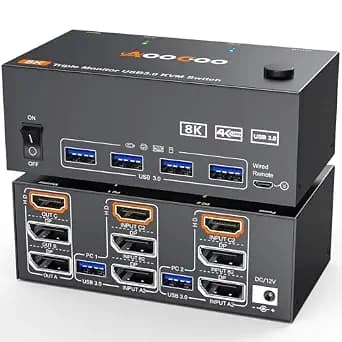
8K@60Hz HDMI2.1 Displayport KVM Switch 3 Monitors 2 Computers 4K@144Hz Triple Monitor KVM Switches with USB 3.0 Port,Wired Remote,Power Adapter and USB3.0 Cables(12cm 2 PC 3 Monitor 8K KVM)
Beschreibung
【Triple Monitor KVM Switch】2 Displayport1.4+HDMI2.1 USB3.0 KVM Switch allows 2 desktops to share 3 monitors and 4 USB3.0 ports(keyboard,mouse and other USB devices).It can make your work space tidy and efficient, also a premium choice for working from home.NOTE:Only when your computer supports 3 display or multi display, you can use this KVM to achieve 2 PC to share 3 monitors.; 【8K@60Hz/4K@144Hz】The resolution and fresh rate of triple monitor KVM switch supports up to 8K@60Hz/4K@144Hz, But please note that:①HDMI part supports 8K@60Hz,4K@120Hz,4K@60Hz,and backward compatible.②Displayport part support 8K@30Hz ,4K@144Hz and backward compatible.Warming: Please use HDMI2.1 and DP1.4 cables, if the set distance allows,the length of cabels more short more better.; 【3 Monitors KVM Switches with 4 USB 3.0 Ports】Triple monitor HDMI+2 Displayport KVM switch with 4 USB 3.0 ports which can recognize keyboard,mouse,printer,scaner and other USB devices. USB 3.0 offers data transfer speeds of up to 5Gbps, while USB 2.0 offers data transfer speeds of only 480Mbps.; 【Extended Mode&Copy Mode】Triple display KVM switches require 2 DP+HDMI connections per computer, and for computers with discrete and integrated graphics cards require both 2 DP+HDMI ports must belong discrete graphics card.; 【Compatibility & 2 Switching Methdos】AOOCOO triple monitors KVM switch driver-free and plug and play. you can press the button on the panel or use the wired remote controller(included in the package) to switch the computers.Three color lights indicate the active computer.; 【Note 】HDMI to DP and DVI/VGA to DP are not supported. If a signal converter or docking station is used, there may be compatibility issues.; 【Package List】1*Triple Monitor USB3.0 KVM Switch+2*USB3.0 Cables(1.5m/4.9ft)+1*Wired remote controller(1.52m/5ft)+1*User manual+1*12V Power Adapter(1.52m/5ft).
Vor- und Nachteile vergleichen
Ähnliche Produkte im direkten Vergleich
Eine zufällige Auswahl analysierter Produkte aus derselben Kategorie. Unterschiedliche Produkte sind nicht zwangsläufig austauschbar.

UGREEN 8K@60Hz HDMI Displayport KVM Switch 3 Monitors 2 Computers, Aluminum

KCEVE KVM Switch 2 Computer 1 Monitor Displayport 4K@240Hz 8K@60Hz, USB 3.0 KVM Switch Displayport 2.1 for 2 PC Share 4 USB3.0 Devices Keyboard Mouse, with USB 3.0 Cable,Wired Remote and Power Supply

KVM/USB Mode KVM Switch 2 Monitors 2 Computers with Audio, ANXQQ 8K@30Hz 4K@144Hz USB 3.0 Dual Monitor KVM Switch Displayport, Share 4 USB Devices with Wired Control and Power Adapter
Eine Sache weniger zu suchen
Vor dem Kauf: kurze Fragen
Is the switching between computers truly seamless, or is there a delay?
Most users report a brief but noticeable delay (typically 1-3 seconds) with a black screen during switching. This is common for hardware KVM switches. While perfectly functional for general work, competitive gamers or those switching constantly for rapid tasks should be aware of this slight lag.
I use three monitors for my workflow. Will this KVM mess up my window positions every time I switch?
This is a common point mentioned in user reviews. Some operating systems can re-arrange windows when display settings are re-detected. While the KVM itself transmits the signal correctly, you may need to use Windows or macOS display settings or third-party window management software to save and restore your preferred layouts after the initial setup.
Are the included cables sufficient, or will I need to buy my own?
The included USB 3.0 cables are quite short (12cm/4.7 inches), designed primarily to connect the KVM to your PCs. You will almost certainly need to supply your own longer, high-quality HDMI or DisplayPort cables to connect your monitors to the KVM switch for a practical desk setup.
Can the USB 3.0 ports power all my peripherals, like external drives and webcams?
The USB hub provides basic connectivity. However, several users note that high-power devices like bus-powered hard drives or RGB peripherals may not get enough power and can disconnect. For such devices, we recommend using a powered USB hub connected to one of the ports or connecting them directly to your computer.
Who is this KVM switch best suited for, and who might want to look elsewhere?
This switch is an excellent, cost-effective solution for professionals, hybrid workers, or enthusiasts who need to share a triple-monitor setup between two computers and can tolerate minor setup quirks. It's less ideal for competitive gamers who require instantaneous, glitch-free switching or users who want a completely automatic, zero-configuration experience. For those with only one or two monitors, a simpler (and often cheaper) dual-monitor KVM may be sufficient.
Von einem ähnlichen Produkt mit mehr Bewertungen in dieser Kategorie: Unitek HDMI KVM Switch 1 Monitor 2 Computers with Power Adapter
Can I switch between computers with a keyboard shortcut, or do I have to press a button?
This model uses a physical button on the unit — there's no hotkey switching. That's the most common complaint in reviews, so if keyboard shortcuts are a must-have for your workflow, you'll want to look at a hotkey-capable KVM instead. If you're fine reaching for a button (or placing the switch within arm's reach), it works reliably.
Do I need to use the included power adapter, or can it run without it?
Use the adapter. While some users have tried bus-powering it, the most stable experience — especially with wireless peripherals — comes from plugging in the included DC adapter. Several reviewers noted mouse dropouts when running unpowered, so treat the adapter as required, not optional.
Will it work with my Mac and Windows PC together, and does it handle 4K?
Yes, mixed Mac/Windows setups are one of its most common use cases, and it's plug-and-play for both. For resolution, check your monitor's specs against the switch's rated maximum before buying — some users with high-refresh or 4K@60Hz displays ran into EDID handshake issues (blank screen after sleep), which is the second-most-cited complaint. Standard 1080p and 4K@30Hz setups report smooth sailing.
Are the cables included, and are they long enough for a desktop tower?
Yes — HDMI and USB cables are in the box, which reviewers consistently call a nice bonus. That said, they're on the short side (roughly 3 ft), so they're ideal for laptop docks or monitors sitting close to both computers. If your tower lives under the desk, plan on buying longer cables.
Who is this KVM best suited for — and who should skip it?
It's a great fit for remote workers, students, or anyone sharing one monitor, keyboard, and mouse between two computers on a budget, especially if you value compact size, included cables, and simple setup. Skip it if you need hotkey switching, dual-monitor output, DisplayPort, or rock-solid EDID behavior with a fussy high-refresh display — in those cases, a TESmart or Cable Matters alternative will save you the return shipping.
Die Antworten beschränken sich auf das Angebot des Herstellers und die von uns analysierten Rezensionen. Fragen, die diese Quellen nicht abdecken, werden hier nicht beantwortet.
Transparent von Grund auf