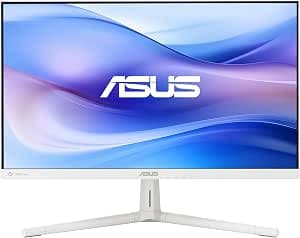
ASUS 27” 1080P Eye Care Monitor (VU279HFI-W) - Full HD, IPS, 100Hz, SmoothMotion, Adaptive Sync, Nano-ion, Eye Care Plus, Blue Light Filter, Flicker Free, VESA Wall Mountable, 3 yr Warranty
Beschreibung
ASUS VU displays are the perfect choice for anyone who wants a great everyday monitor. They offer all the features and connectivity you need for a variety of tasks, from gaming and entertainment to productivity and creativity. Additionally, VU279HFI-W equipped with Nano-ion generator combines the traditional function of displaying visual content with the added benefit of improving air quality and potentially enhancing user well-being.
Vor- und Nachteile vergleichen
Ähnliche Produkte im direkten Vergleich
Eine zufällige Auswahl analysierter Produkte aus derselben Kategorie. Unterschiedliche Produkte sind nicht zwangsläufig austauschbar.

SAMSUNG 49-inch Odyssey G9 (G91F) DQHD, 144Hz, Curved Gaming Monitor, Ultra-Wide 32:9 Screen, DisplayHDR 600, AMD FreeSync™ Premium Pro, Ergonomic Stand, LS49FG910ENXZA, 2025

Sceptre IPS 27 Inch 2K 2560 x 1440p QHD 75Hz DisplayPort HDMI 99% sRGB Build-in Speakers Machine Black (E275W-QPT)

KYY Laptop Screen Extender, 15.6" Monitor Extender with Type-C Plug&Play, 1080P FHD Portable Triple Monitor for Laptop with Alloy Dual Display fit 13"-17", Portable Extended Screen for Mac/Wins/Chrome
Eine Sache weniger zu suchen
Vor dem Kauf: kurze Fragen
How stable is the stand, and can I adjust the monitor's height or angle?
The included stand offers tilt adjustment but does not have height, swivel, or pivot functions. Some users find it a bit basic for ergonomics. However, the monitor is VESA wall-mount compatible (100x100mm), which is a popular solution. Many Reddit users recommend pairing it with a cheap monitor arm for a perfect, flexible setup.
I've heard about "Eye Care" technology. What does it actually do, and will it help with long work sessions?
Absolutely. The Eye Care suite combines a flicker-free backlight and a blue light filter to reduce the leading causes of eye strain—screen flicker and high-energy blue light. Based on numerous reviews from programmers and writers, these features are very effective for making 8+ hour workdays much more comfortable, which is a major reason this monitor is praised for productivity.
Can I use this with both a gaming console and a laptop, and is the 100Hz refresh rate worth it?
Yes, it's very versatile! With both HDMI and DisplayPort inputs, you can easily connect a PlayStation, Xbox, or Nintendo Switch alongside a laptop or PC. The jump from 60Hz to 100Hz, paired with Adaptive-Sync, provides a noticeably smoother experience in both fast-paced work (scrolling, dragging windows) and casual gaming. It's a sweet spot for general use, though hardcore competitive gamers often seek 144Hz+.
How are the built-in speakers, and what's the warranty coverage?
To be direct, the speakers are very basic—fine for system sounds or a quick video call in a quiet room, but not for music, movies, or gaming audio. We strongly recommend using external speakers or headphones. The monitor is backed by a reliable 3-year manufacturer's warranty, covering defects in materials and workmanship, which adds great peace of mind to your purchase.
Who is this monitor best suited for, and who might want to look at an alternative?
This monitor is an excellent choice for remote workers, students, and general users who prioritize eye comfort, vibrant IPS colors, and great value for everyday productivity and media consumption. If your top priority is a fully ergonomic stand right out of the box or you are a competitive esports player needing the highest refresh rate, you might consider models specifically designed with those features. For most people seeking a quality, comfortable 27-inch display, this ASUS model hits the mark.
Von einem ähnlichen Produkt mit mehr Bewertungen in dieser Kategorie: KOORUI 24 Inch Gaming Monitor, 180Hz 1080P VA Display with 3000:1 Contrast
Does this monitor really run at 180Hz, and what do I need to enable it?
Yes — it's a native 180Hz panel, but you'll need to switch it on manually. Connect via the included HDMI cable (or a DisplayPort-capable setup), then set 180Hz in your GPU's display settings; it defaults to a lower refresh rate out of the box. Many Reddit and YouTube users note that enabling Adaptive Sync/FreeSync alongside it gives the smoothest experience, and it works with both AMD and NVIDIA cards.
How does the VA panel perform for gaming and everyday work?
The 3000:1 contrast gives noticeably deeper blacks than typical IPS budget monitors, which shines in dark game scenes and movies. For fast-paced competitive shooters, some TikTok and Reddit users mention mild ghosting/smearing in dark transitions — it's great for casual gaming, students, and office work, but color-critical creators or hardcore FPS players may prefer an IPS panel.
The stand looks basic — can I adjust the height or mount it?
Correct, the included stand only tilts (-5° to 20°) and doesn't offer height, swivel, or pivot adjustment, and a few users find the base slightly wobbly. The good news: it's VESA 100×100mm compatible, so a monitor arm or desk mount solves ergonomics entirely — a popular fix among dual-monitor and dorm-room setups.
What if I receive a unit with a dead pixel or backlight bleed?
Budget monitors can vary unit to unit, and some buyers report stuck pixels or corner bleed — but KOORUI backs it with a 3-year manufacturer warranty. If your unit arrives defective, contact the seller for a replacement or refund promptly; most users who did so report a smooth resolution, so inspect the screen within the return window.
Is it good value, and who is it best suited for?
At around $120, it's widely praised as one of the best budget 180Hz options — ideal for students, casual gamers, home-office users, and compact or dual-monitor setups. Just set expectations: no built-in speakers, a single HDMI plus VGA, and basic ergonomics. If you need height adjustment, color accuracy, or built-in audio, consider spending more on an IPS alternative.
Die Antworten beschränken sich auf das Angebot des Herstellers und die von uns analysierten Rezensionen. Fragen, die diese Quellen nicht abdecken, werden hier nicht beantwortet.
Transparent von Grund auf