Was Kunden gut finden
Striking visual quality for gaming
Several reviewers describe crisp, clear images and impressive gaming visuals, with some calling it a major upgrade.
Unser Kauf-Fazit
Reviewers praise crisp, smooth gaming imagery, but one reports HDR instability and unclear text.
Buyers seeking a visually impressive gaming monitor who mainly care about crisp, smooth gameplay imagery.
Buyers who need dependable HDR behavior or clear text for productivity work.
Die 30-Sekunden-Lektüre
Was Kunden gut finden
Several reviewers describe crisp, clear images and impressive gaming visuals, with some calling it a major upgrade.
Der wichtigste Vorbehalt
One reviewer reported HDR problems, including lag and instability, and found text unclear and HDR no better than SDR.
Bevor Sie sich entscheiden
One reviewer compared it favorably to a prior OLED monitor, suggesting prior OLED familiarity shaped expectations.
Von einem ähnlichen Produkt mit mehr Bewertungen in dieser Kategorie: KOORUI 24 Inch Gaming Monitor, 180Hz 1080P VA Display with 3000:1 Contrast
Was Kunden gut finden
Several reviewers describe the monitor as a strong budget purchase, citing impressive specs for the money and satisfaction with gaming use.
Der wichtigste Vorbehalt
Several reviewers report the monitor failing or coming apart after months to a couple of years, including a dead screen and a failing power cord.
Bevor Sie sich entscheiden
Two reviewers note that setup benefits from adjusting settings in your GPU software, including color, brightness, and VRR.
Beschreibung
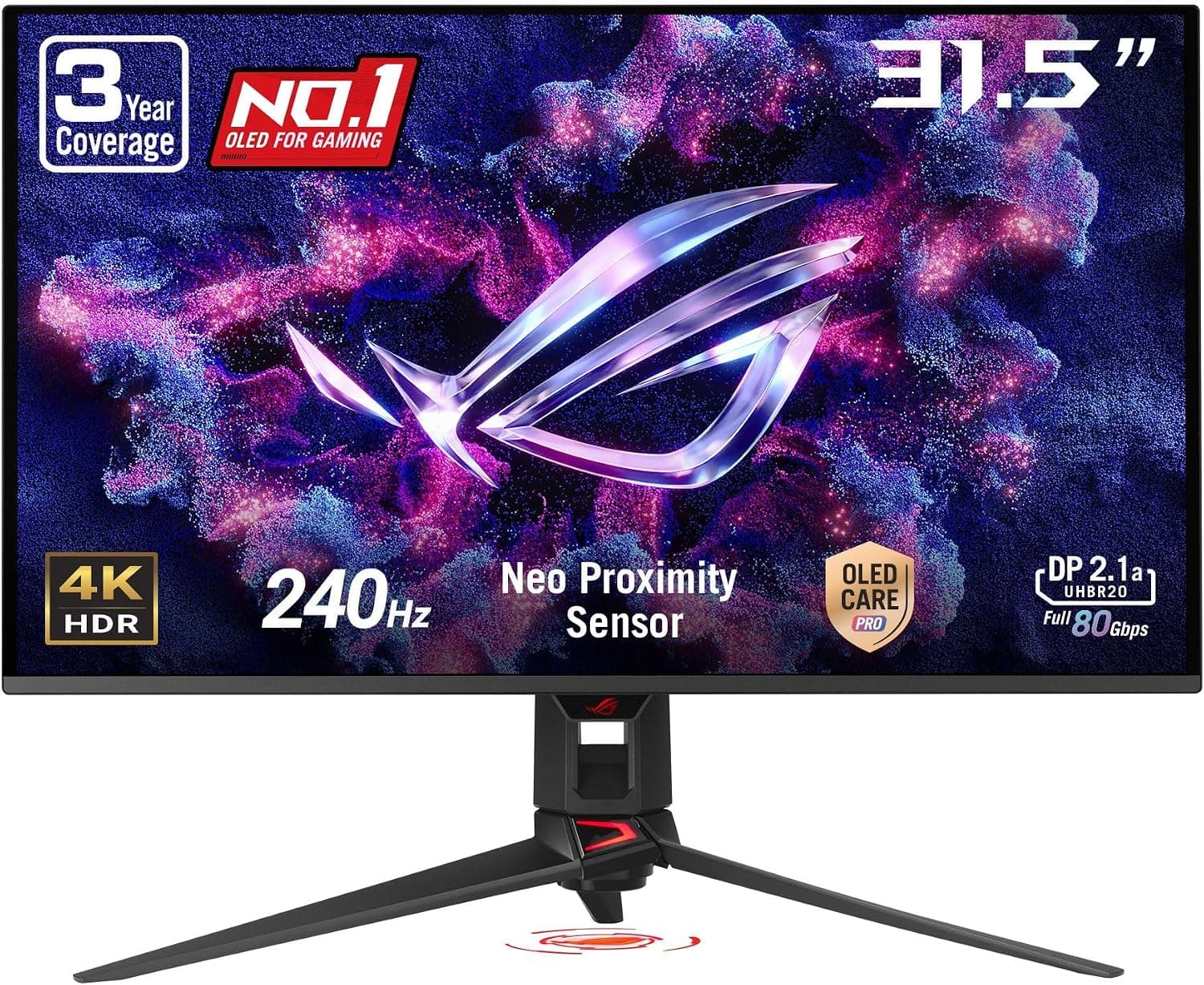
The ROG Swift OLED PG32UCDMR boasts a 32-inch 4K QD-OLED panel that delivers astounding visuals at a buttery-smooth 240 Hz. Powered by third-generation QD-OLED technology, the PG32UCDMR delivers vibrant colors, the deepest black hues, and the brightest highlights. Plus, the 0.03 ms response time ensures blur-free action, even in intense gameplay. Inside, an advanced custom heatsink offers exceptional cooling to reduce the likelihood of burn-in and improve performance and longevity of the OLED panel. This premium monitor is designed for gamers who demand the very best, offering an unbeatable combination of size, image quality, and refresh rate speed for exhilarating gaming experiences.
Vor- und Nachteile vergleichen
Eine zufällige Auswahl analysierter Produkte aus derselben Kategorie. Unterschiedliche Produkte sind nicht zwangsläufig austauschbar.

Sceptre 34-Inch Curved Ultrawide WQHD Monitor, 3440 x 1440, R1500, Up to 180Hz/165Hz, DisplayPort x2, 100% sRGB, 1ms, Built-in Speakers, Black (C345B-QUT168 Series)

LG 27G610A-B 27-inch Ultragear QHD (2560 x 1440) IPS Gaming Monitor, 200Hz, 1ms, AMD FreeSync Premium, VESA DisplayHDR 400, HDMI, DisplayPort, Tilt/Height/Swivel/Pivot Stand, Black

Upperizon Portable Monitor 21.5 inch FHD 110% sRGB 120Hz IPS HDR HDMI USB-C Travel Monitor for Laptop MacBook PC Surface PS5 Xbox, Large External Display with Kickstand & Speakers, VESA Compatible
Belege prüfen
Einbezogen bedeutet nicht als authentisch bestätigt. Markiert bedeutet nicht als Fälschung nachgewiesen. Dies sind analytische Einordnungen.
3 veranschaulichende Auszüge werden angezeigt, nicht der gesamte Rezensionsbestand.
PG32UCDMR - once you go OLED, you never go back!
“I've had this monitor for a few months now. I grabbed it when it was on sale for $899. PG32UCDMR. Once you go OLED, you never go back! I currently had(still have) a 27" CORSAIR XENEON OLED that I spent $1,000 on when OLEDs were just hitting the market for consumers. I really wanted a 32" OLED, and this most certainly met my expectations. For those into color accuracy and are seeking in depth information about this subject, I cannot help with that, but I can say the colors are great. The constant from completely black to very vibrant colors is mind-blowing, ESPECIALLY in 2160p/4k resolution. 240hz and 0.3ms latency makes for a god tier FPS monitor. Lightning fast. Incredibly easy to setup, you snap it onto the stand and no tools are required, you screw it in the bottom by hand. I did decide to get a dual arm monitor, but the stand is fairly adjustable, but obviously not more than a desk monitor hydraulic arm. If you do use it with the stand it comes with, it does come with a light that shines down onto your desk with interchangeable ASUS logos to project onto your desk. A very nice touch. Paired with my 5090 builds, ide overall say this was worth the money I spent on it, no doubt. The cons I have found are 2 things- 1. You'll see in my picture the reflection of my pc onto the PG32UCDMR monitor, it has a "purple tint", this is NOT noticed in darker rooms. Other reviews say this can be problematic in bright or sunlit rooms. So I would definitely consider this before purchasing. I am in a darker room, so I don't notice it one bit unless I shine a light onto the screen directly. 2. Mounting / VESA - when I went to mount the monitor to my desk monitor arm, it does NOT screw into the back of the monitor like most monitors. It has an adapter that hangs by gravity and clicks in at the bottom, the you secure this to the arm. This did not and still feels a little unsafe at times, as opposed to having 4 screws going directly into the back, you may find yourself apprehensive to move it freely without worrying if it may fall. I do wish that ASUS would have allowed a standard 4 screw in like most monitors. Above all, highly recommend for the price, keep in mind the two cons I listed above. ASUS of course always makes their products an experience, so you will receive a sorted zip of bag with cables, manual, stickers and other goodies.”
Erkannte Signale: Konkretes Detail: quantity, entity, comparison, process · Liest sich wie eine authentische Stimme
First 4K monitor, waste of money
“Never been more disappointed with a monitor before. This is my first 4K one, and I've had so many issues with HDR. Trying to turn on HDR on will sometimes send the monitor into a frenzy or make it lag even though I have RTX 4070, it's super flaky. Not to mention the HDR just.. doesn't look better than SDR. Text is not clear and overall, I'm not feeling the quality of it.”
Erkannte Signale: Konkretes Detail: entity, scenario, process · Liest sich wie eine authentische Stimme
It's one of those WOW moments!
“Incredible monitor!! Through and through, I'm blown away. Everything looks so great,and for gaming what an upgrade! Arrived in perfect shape from Amazon(thx guys) . I cant remember when a tech product has had that kind of an effect on me. It's THAT GOOD. Great job Asus!! Fantastic Monitor!!”
Erkannte Signale: Konkretes Detail: scenario, entity · Werblich klingende Sprache
Eine Sache weniger zu suchen
It's the top concern we see across Reddit and YouTube threads, and it's fair to ask. This model uses a custom heatsink plus OLED Care Pro with a Neo Proximity Sensor that blanks the screen when you step away, which meaningfully lowers burn-in risk. More importantly, ASUS backs it with a 3-year warranty that explicitly includes burn-in coverage and Advance Replacement — a detail many reviewers call a genuine trust signal compared to older OLEDs.
It depends on your card and games. Competitive titles and older games can approach 240Hz on high-end GPUs, while demanding AAA titles will land lower — and that's normal. The monitor supports DisplayPort 2.1 (80Gbps) and HDMI 2.1, plus FreeSync Premium Pro and G-Sync Compatible, so variable refresh keeps things smooth even below the cap. If you're on a mid-tier GPU, a 1440p OLED may deliver a better experience for the money.
This is the most common caveat in user discussions. QD-OLED's subpixel layout can produce slight color fringing on fine white text and UI edges, which some productivity users notice immediately and others never see. Gaming, video, and photo editing look spectacular thanks to 99% DCI-P3 and Delta E < 2. If your day is mostly spreadsheets and code, consider viewing one in person first — or pair it with an IPS panel for static work.
Yes — connectivity is a strong point. Dual HDMI 2.1 ports support 4K 120Hz with VRR for consoles, and Dolby Vision is supported for compatible content. The USB-C port delivers 90W Power Delivery, so many laptops run display and charging over a single cable. Premium DP 2.1 and HDMI Ultra High Speed cables are included, which saves you from the "do I need a new cable?" rabbit hole.
For competitive gamers, HDR enthusiasts, and creators who want one flagship display, the combination of 4K, 240Hz, 0.03ms response, and burn-in-covered warranty is hard to beat — most owners call it the best monitor they've owned. Skip it if you're on a tight budget, have a small desk (the stand is deep — a VESA arm helps), or mainly do static office work where text fringing and price matter more than motion clarity.
Von einem ähnlichen Produkt mit mehr Bewertungen in dieser Kategorie: KOORUI 24 Inch Gaming Monitor, 180Hz 1080P VA Display with 3000:1 Contrast
Yes — it's a native 180Hz panel, but you'll need to switch it on manually. Connect via the included HDMI cable (or a DisplayPort-capable setup), then set 180Hz in your GPU's display settings; it defaults to a lower refresh rate out of the box. Many Reddit and YouTube users note that enabling Adaptive Sync/FreeSync alongside it gives the smoothest experience, and it works with both AMD and NVIDIA cards.
The 3000:1 contrast gives noticeably deeper blacks than typical IPS budget monitors, which shines in dark game scenes and movies. For fast-paced competitive shooters, some TikTok and Reddit users mention mild ghosting/smearing in dark transitions — it's great for casual gaming, students, and office work, but color-critical creators or hardcore FPS players may prefer an IPS panel.
Correct, the included stand only tilts (-5° to 20°) and doesn't offer height, swivel, or pivot adjustment, and a few users find the base slightly wobbly. The good news: it's VESA 100×100mm compatible, so a monitor arm or desk mount solves ergonomics entirely — a popular fix among dual-monitor and dorm-room setups.
Budget monitors can vary unit to unit, and some buyers report stuck pixels or corner bleed — but KOORUI backs it with a 3-year manufacturer warranty. If your unit arrives defective, contact the seller for a replacement or refund promptly; most users who did so report a smooth resolution, so inspect the screen within the return window.
At around $120, it's widely praised as one of the best budget 180Hz options — ideal for students, casual gamers, home-office users, and compact or dual-monitor setups. Just set expectations: no built-in speakers, a single HDMI plus VGA, and basic ergonomics. If you need height adjustment, color accuracy, or built-in audio, consider spending more on an IPS alternative.
Die Antworten beschränken sich auf das Angebot des Herstellers und die von uns analysierten Rezensionen. Fragen, die diese Quellen nicht abdecken, werden hier nicht beantwortet.
Transparent von Grund auf