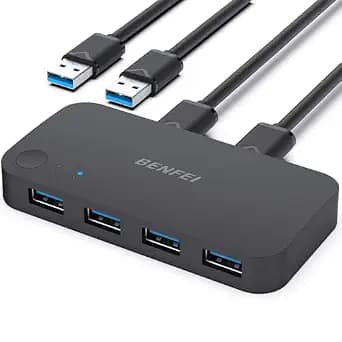
BENFEI USB 3.0 Switch, USB Switch 2 Computers Share 4 USB for PC, Mouse, Keyboard, Printer, Scanner, USB KVM Switch Selector Compatible with Windows, Mac, Linux
Beschreibung
Share Multiple USB Devices between 2 Computer : The BENFEI 2 in 4 out USB 3.0 kvm switch supports 2 computers share 4 USB devices like keyboards, mouses, U disk, printers, scanners, USB cameras, headphones, etc. It's convenient for you to switch freely between your work computer and personal computer, driver free and compatible with multiple OS, such as windows 7/10/8/8.1/7/Vista/XP and Mac OS, Linux, and Chrome OS.; Transfer Files in Seconds: With the 4x USB 3.0 ports, BENFEI USB Switcher supports up to 5Gbps data transfer speed. You can easily transfer data from U disk, mobile hard disk to computer. It's backward compatible with USB 2.0, too.; Switch Easily: With the USB switcher button and LED indicator design, you can freely switch multiple USB devices between two computers with one click and clearly know the working status. Please note: When connected, it could work only when using the BENFEI USB A to USB A cable.; Multiple USB Devices Support: BENFEI USB Switch provides an extra USB C(5V 3A) power supply slot. If you use some high power consumption devices such as HDD, USB cameras, headphones, etc, please connect extra power for stable performance. (The USB A-USB Charging cable is included, but the power adapter is not); 18 MONTH WARRANTY : Exclusive BENFEI Unconditional 18-month Warranty ensures long-time satisfaction of your purchase; Friendly and easy-to-reach customer service to solve your problems timely
Vor- und Nachteile vergleichen
Ähnliche Produkte im direkten Vergleich
Eine zufällige Auswahl analysierter Produkte aus derselben Kategorie. Unterschiedliche Produkte sind nicht zwangsläufig austauschbar.

USB 3.0 Switch Selector for 2 Computers, USB Switcher Sharing 4 USB Devices Peripheral Hub for Mouse, Keyboard, Scanner, Printer; for Mac/Windows/Linux; 2 Pack USB Cables Included

KVM/USB Mode KVM Switch 2 Monitors 2 Computers with Audio, ANXQQ 8K@30Hz 4K@144Hz USB 3.0 Dual Monitor KVM Switch Displayport, Share 4 USB Devices with Wired Control and Power Adapter

USB 3.0 HDMI KVM Switch 1 Monitors 2 Computers, 4K@60Hz KVM Switches for 2 Computers Sharing Monitor Keyboard Mouse Hard Drives Printer, with EDID Adaptive, 2USB Cable and Controller
Eine Sache weniger zu suchen
Vor dem Kauf: kurze Fragen
¿Puedo usar este conmutador para compartir un disco duro externo o SSD entre dos ordenadores?
Para la mayoría de los discos duros externos, especialmente los HDD portátiles que obtienen energía únicamente del puerto USB, es probable que este conmutador *no* proporcione suficiente energía. Muchos usuarios en foros técnicos informan que las unidades arrancan y luego se desconectan. Funciona mejor con dispositivos de bajo consumo como teclados, ratones, cámaras web (con alimentación separada), impresoras y lectores de tarjetas. Para los discos duros, necesitaría conectar un concentrador USB con alimentación externa a uno de los puertos del conmutador.
¿Es realmente plug-and-play y funcionará con mi Mac y mi PC con Windows?
¡Sí! Esta es su característica más elogiada. El conmutador BENFEI no requiere software ni controladores. Simplemente conecte los dos cables USB a sus computadoras y sus periféricos a los cuatro puertos del conmutador. Es compatible con Windows, macOS y Linux. Como dijo un usuario de Reddit: "Simplemente funcionó al instante para mi configuración de MacBook de trabajo y PC para juegos."
¿Qué tan confiable es el botón de cambio y la función de cambio automático?
El botón manual es generalmente confiable para el uso diario, aunque algunos notan que tiene una sensación ligera y de plástico. La función de cambio automático (activada al mover el mouse al borde de la pantalla) es útil, pero puede ser ligeramente inconsistente dependiendo de su sistema operativo y configuración del mouse. La mayoría de los usuarios a largo plazo recomiendan usar el botón manual para un cambio garantizado, tratando el cambio automático como una ventaja conveniente.
¿Cuáles son las principales limitaciones que debo conocer antes de comprar?
Las limitaciones clave son la entrega de energía y la construcción. 1) No puede alimentar dispositivos USB de alto consumo (como la mayoría de los discos duros externos) sin equipo adicional. 2) No comparte señales de monitor/video — es solo para periféricos USB. 3) La construcción es funcional y ligera, no premium. Si necesita una solución robusta y con alimentación para equipos más exigentes, un conmutador KVM con alimentación dedicado podría ser más adecuado.
¿Para quién es ideal este producto?
Es perfecto para cualquiera que necesite compartir dispositivos de entrada básicos y periféricos de bajo consumo entre dos ordenadores. Por ejemplo: teletrabajadores que alternan entre un portátil de empresa y un ordenador de sobremesa personal, estudiantes con un portátil y un PC de casa, o desarrolladores que prueban en dos sistemas. Es una solución sencilla y asequible para mantener el escritorio ordenado y evitar el intercambio de cables.
Von einem ähnlichen Produkt mit mehr Bewertungen in dieser Kategorie: Unitek HDMI KVM Switch 1 Monitor 2 Computers with Power Adapter
Can I switch between computers with a keyboard shortcut, or do I have to press a button?
This model uses a physical button on the unit — there's no hotkey switching. That's the most common complaint in reviews, so if keyboard shortcuts are a must-have for your workflow, you'll want to look at a hotkey-capable KVM instead. If you're fine reaching for a button (or placing the switch within arm's reach), it works reliably.
Do I need to use the included power adapter, or can it run without it?
Use the adapter. While some users have tried bus-powering it, the most stable experience — especially with wireless peripherals — comes from plugging in the included DC adapter. Several reviewers noted mouse dropouts when running unpowered, so treat the adapter as required, not optional.
Will it work with my Mac and Windows PC together, and does it handle 4K?
Yes, mixed Mac/Windows setups are one of its most common use cases, and it's plug-and-play for both. For resolution, check your monitor's specs against the switch's rated maximum before buying — some users with high-refresh or 4K@60Hz displays ran into EDID handshake issues (blank screen after sleep), which is the second-most-cited complaint. Standard 1080p and 4K@30Hz setups report smooth sailing.
Are the cables included, and are they long enough for a desktop tower?
Yes — HDMI and USB cables are in the box, which reviewers consistently call a nice bonus. That said, they're on the short side (roughly 3 ft), so they're ideal for laptop docks or monitors sitting close to both computers. If your tower lives under the desk, plan on buying longer cables.
Who is this KVM best suited for — and who should skip it?
It's a great fit for remote workers, students, or anyone sharing one monitor, keyboard, and mouse between two computers on a budget, especially if you value compact size, included cables, and simple setup. Skip it if you need hotkey switching, dual-monitor output, DisplayPort, or rock-solid EDID behavior with a fussy high-refresh display — in those cases, a TESmart or Cable Matters alternative will save you the return shipping.
Die Antworten beschränken sich auf das Angebot des Herstellers und die von uns analysierten Rezensionen. Fragen, die diese Quellen nicht abdecken, werden hier nicht beantwortet.
Transparent von Grund auf