Was Kunden gut finden
Easy setup and low ink costs
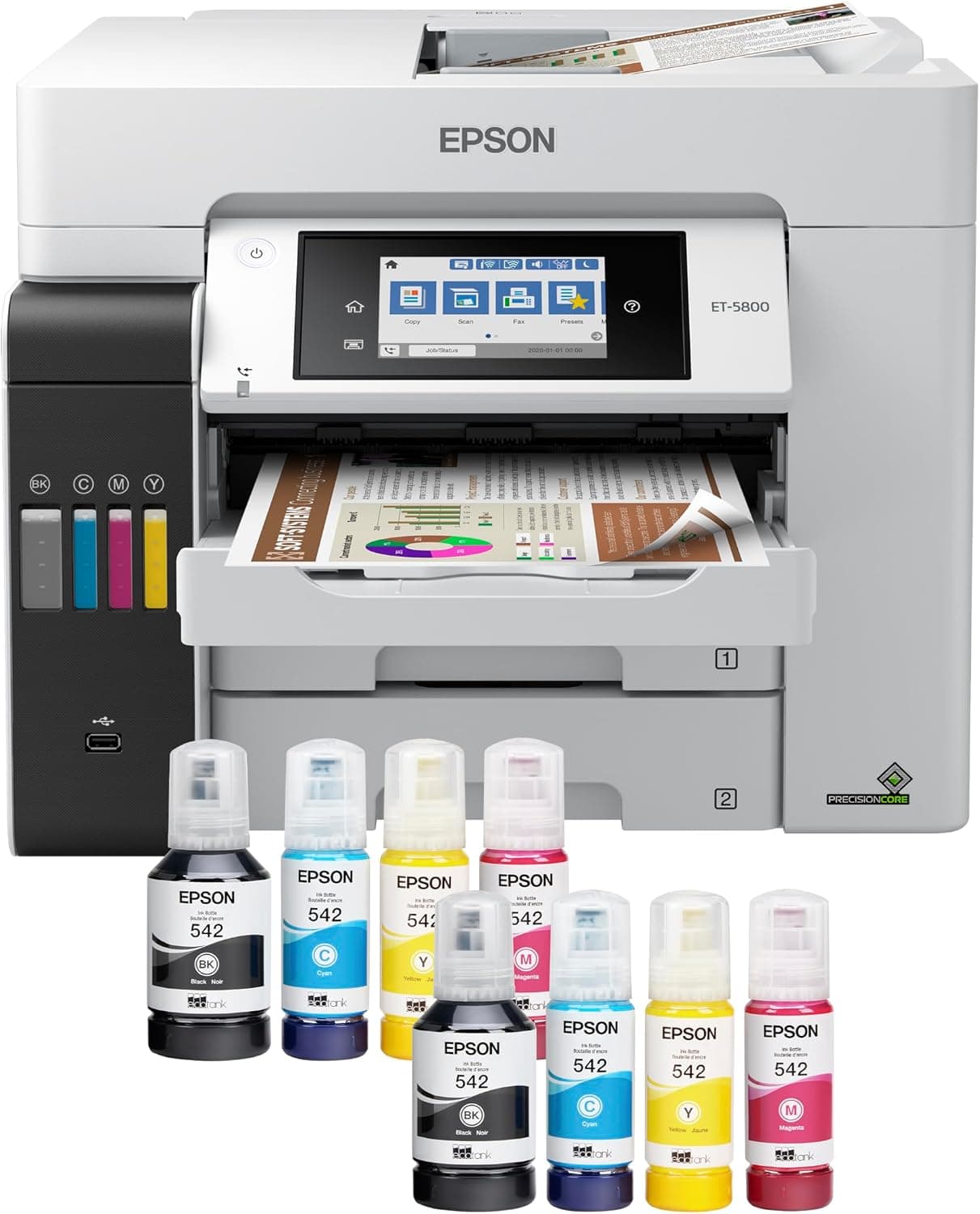
Reviewers frequently praise the simple setup, clean ink-tank filling, and the savings from not buying expensive cartridges. Many also highlight strong print quality and fast, quiet operation.
Die 30-Sekunden-Lektüre
Was Kunden gut finden
Reviewers frequently praise the simple setup, clean ink-tank filling, and the savings from not buying expensive cartridges. Many also highlight strong print quality and fast, quiet operation.
Der wichtigste Vorbehalt
Some users report serious connectivity problems, especially with newer Wi-Fi routers and Macs, and one long-term owner describes recurring issues like false out-of-paper errors and random pages printing.
Bevor Sie sich entscheiden
This is a large office-sized printer, so verify the measurements fit your space. Also note that some buyers mention needing to purchase a waste ink cartridge separately, and one reviewer claims the promised free ink offer was not honored.
Von einem ähnlichen Produkt mit mehr Bewertungen in dieser Kategorie: HP Envy 6555e Wireless All-in-One Color Inkjet Printer, Portobello, Print, scan, Copy, Duplex Printing Best-for-Home, 3 Month Instant Ink Trial Included, AI-Enabled (714N5A)
Was Kunden gut finden
Many reviewers found setup quick and simple, and several praised the printer's print quality, including automatic double-sided printing.
Der wichtigste Vorbehalt
Some reviewers had a difficult setup experience or reported ongoing reliability issues, such as needing to unplug and replug the printer before each use.
Bevor Sie sich entscheiden
One reviewer noted ink doesn't last long, and another needed a YouTube video to connect to Wi-Fi, so it's worth checking your printing volume and wireless setup needs.
Erst dein Anwendungsfall
5 von 17 Erwähnungen beschreiben eine negative Erfahrung (29 %).
3 von 13 Erwähnungen beschreiben eine negative Erfahrung (23 %).
2 von 13 Erwähnungen beschreiben eine negative Erfahrung (15 %).
1 von 8 Erwähnungen beschreiben eine negative Erfahrung (13 %).
25 von 66 Erwähnungen beschreiben eine negative Erfahrung (38 %).
12 von 26 Erwähnungen beschreiben eine negative Erfahrung (46 %).
6 von 13 Erwähnungen beschreiben eine negative Erfahrung (46 %).
3 von 9 Erwähnungen beschreiben eine negative Erfahrung (33 %).
Eine Rezension kann mehrere Themen ansprechen. Die Prozentsätze beziehen sich auf die von uns analysierten Rezensionen, nicht auf alle Käufer oder die allgemeine Ausfallrate des Produkts.
Von einem ähnlichen Produkt mit mehr Bewertungen in dieser Kategorie: HP Envy 6555e Wireless All-in-One Color Inkjet Printer, Portobello, Print, scan, Copy, Duplex Printing Best-for-Home, 3 Month Instant Ink Trial Included, AI-Enabled (714N5A)
198 von 368 Erwähnungen beschreiben eine negative Erfahrung (54 %).
222 von 319 Erwähnungen beschreiben eine negative Erfahrung (70 %).
165 von 236 Erwähnungen beschreiben eine negative Erfahrung (70 %).
66 von 172 Erwähnungen beschreiben eine negative Erfahrung (38 %).
73 von 139 Erwähnungen beschreiben eine negative Erfahrung (53 %).
51 von 79 Erwähnungen beschreiben eine negative Erfahrung (65 %).
135 von 172 Erwähnungen beschreiben eine negative Erfahrung (78 %).
61 von 78 Erwähnungen beschreiben eine negative Erfahrung (78 %).
Vor- und Nachteile vergleichen
Eine zufällige Auswahl analysierter Produkte aus derselben Kategorie. Unterschiedliche Produkte sind nicht zwangsläufig austauschbar.

Epson EcoTank ET-M1170 Wireless Monochrome Supertank Printer

Epson EcoTank ET-4800 Wireless All-in-One Cartridge-Free Supertank Printer with Scanner, Copier, Fax, ADF and Ethernet – Ideal-for Your Home Office, White

Epson EcoTank ET-3950 Wireless All-in-One Color Supertank Printer with up to 3 Years of Ink Refillable Tanks, Perfect for Home Office, 18 PPM, 2.4" Colorful Touchscreen, Auto Document Feeder - White
Belege prüfen
Einbezogen bedeutet nicht als authentisch bestätigt. Markiert bedeutet nicht als Fälschung nachgewiesen. Dies sind analytische Einordnungen.
3 veranschaulichende Auszüge werden angezeigt, nicht der gesamte Rezensionsbestand.
Excellent Epson, worth the investment!
“First, this is a big printer so double check the measurement specs before purchasing if space is an issue. First impressions: very well built, especially comparing to ET versions such as the ET-4800 ( see my review on that one for details). This is a sturdy printer, you can feel it when you lift the scanning bed, pull out the paper trays, etc. Printing quality: excellent right out of the box. I didn’t need to do an extensive alignment or cleaning during setup, everything printed perfectly and was photo quality. Setup was easy. Although it has a fax feature, I don’t use that so I didn’t need to set it up. Printing: using the rear paper trays, it prints on 100lb card stock very easily. I recommend only loading a few pages at a time to avoid any issues. I loaded 5 pages and made prints without any issues. 65 lb card stock was also easy to print on using the back paper feed tray and I loaded 8 sheets without an issue but know it could probably handle a few more. Just remember that the thicker the paper the more chance of having it jam with multiple sheets in the rear paper try. AND, only use the rear tray feed for cardstock or other thick paper. The actual paper tray drawers, there are two and you can set them up for different sizes and types of paper, very convenient. Now the cool detail: most printers have a flimsy plastic slide tray to catch the prints as they come out of the printer. Not this one. This has a really amazing tray catch that comes out of the printer automatically (it is motorized), and when you are done there is a little illuminated icon on the screen that looks like the printer, you press it and the tray retracts. Pretty cool detail. The screen: very easy to use and you can actually see it, unlike the postage stamp size screen they used in the ET-4800. All features are very easy to find and select and the icons are illuminated. Using this screen, setup was very easy. Ink: again a very good feature and very well thought out. The bottles are keyed so they fit in the receptacle. Simply unscrew the cap, tip them over (they won’t spill or leak) and place them in the correct color, the bottles automatically fill the tank. When done filling, remove the bottle and put the cap back on, again they won’t spill or leak because they have a mechanism that prevents it from doing so. Overall: excellent printer, expensive but over time the ink savings alone help ease the sticker price. It is heavy and sturdy, has wireless capability so you can put it anywhere and print with ease connected to your wireless network, has the ability to print from android and IPhone with an app, and it has amazing prints. This is one printer I highly recommend.”
Erkannte Signale: Konkretes Detail: entity, comparison, process · Erwähnt: print quality, setup · Liest sich wie eine authentische Stimme
OFFICE Size with many features/options !
“THis is an OFFICE sized All-in-One. has many features and options for print jobs that are well suited for offices, teachers, etc. vs. just "home/home-office" . i wanted double-sided print/scan/copy capability and it definitely does that . The printer is very fast compared to my old HP OfficeJet Pro 8600 (for home-office use) and the Ink Bottles seem to be very economical than Ink Cartridges i was using before . i recommend this for those that need an OFFICE capable product at a reasonable OFFICE price . It did take me about 3 hours to set it up....i had to repeat the WiFi connection steps multiple times ....the fax line outlet is behind and i did not realize there were 2 line outlets......i used the wrong one.....and like someone else mentioned , i am still getting conflicting error/failed messages on items . i think there is disconnect between the Control Panel on the machine and the app on my laptop ? i am just familiaring myself with the many options and 382 page User Manuel. I am retired......so i definitely "over-bought" in terms of overall need of many of the features....but that is not an issue for me. I do recommend it . I Do feel that the machine should come with a basic diagram of all the parts , buttons, connection holes, etc. and basic operating instructions . i could have used that quicker along with the QUick Start Guide. it is Very HEAVY !!! i called Tech Support but they only emailed me some links .”
Erkannte Signale: Konkretes Detail: entity, comparison, features · Erwähnt: features, print speed, ink cost · Liest sich wie eine authentische Stimme
Not MAC friendly
“Being that this is a $742 dollar printer it should NOT have any issues. Connectivity is terrible. The new WIFI routers will not connect for functions designed to use on the actual printer window. I do not want to go from my computer to scan a document. I want to stand at my printer and scan a document and send it to my computer. The printer is 2.4mhz transmission, where the new routers are for 5mhz only. You would have to actually purchase a WIFI extender that supports 2.4mhz in order to communicate, or use ethernet. What's the point of wireless if you have to wire it. Not an option for me since my office is on the complete opposite side of the house where the router is. Ridiculous!!!! And then the printer software is designed for intel application (Windows). Mac/Apple now do not support intel applications and this causes an issue. Shame on Apple! Shame on Epson! With today's technology, all this should be addressed and functioning when spending this kind of money on a printer. Whether it be a windows or mac installation, they both should work. If not compatible with Mac because of the Intel BS it should be pointed out in the system requirements. It is not. Very disappointed. UGH Ugh Ugh”
Erkannte Signale: Konkretes Detail: quantity, entity, scenario · Erwähnt: connectivity · Liest sich wie eine authentische Stimme
Eine Sache weniger zu suchen
The manufacturer lists print speeds up to 25 ISO ppm black, and multiple reviewers describe it as very fast, including one who compared it favorably to an HP OfficeJet Pro 8600 and another who appreciated how quickly it printed documents.
Reviewers consistently describe setup as easy, with one calling it "extremely easy to set up" and another noting it was easy and clean to fill the ink tanks, though one reviewer warned that removing the shipping tape is a pain.
The listing states you can save up to 80 percent with low-cost replacement ink bottles versus standard-capacity color laser toner cartridges, at about 2 cents per color ISO page versus 14 cents with cartridges, and reviewers specifically praise no longer needing expensive ink cartridges.
The listing describes two 250-sheet front paper trays, a rear specialty-paper feed, a 4.3" color touchscreen, and hands-free voice-activated printing, and reviewers confirm double-sided print/scan/copy capability and full duplex scanning.
Reviewers describe print quality as good to excellent, with one noting it is not quite laser jet quality but not far off, and the listing cites PrecisionCore Heat-Free Technology delivering high-volume, print-shop-quality output with DURABrite pigment-based ink.
Von einem ähnlichen Produkt mit mehr Bewertungen in dieser Kategorie: HP Envy 6555e Wireless All-in-One Color Inkjet Printer, Portobello, Print, scan, Copy, Duplex Printing Best-for-Home, 3 Month Instant Ink Trial Included, AI-Enabled (714N5A)
Most customer reviews describe setup as easy, with one reviewer calling it the easiest setup they've ever done, though another reviewer reported setup was a nightmare that took hours. One reviewer needed a YouTube video to find the correct steps to connect to Wi-Fi.
Yes. The manufacturer's listing states it has auto 2-sided printing, and customer reviews confirm it prints automatically on both sides and handles double-sided documents without difficulty.
Yes. The listing states it offers wireless and mobile printing and works with the HP app for printing, scanning, copying, or faxing from a smartphone, PC, or tablet. One reviewer said the phone app was very easy to use and they liked being able to print from their phone.
The listing states it includes 3 months of Instant Ink with HP+ activation, after which a monthly fee applies unless cancelled.
The listing states print speeds up to 7 ppm color and 10 ppm black.
Die Antworten beschränken sich auf das Angebot des Herstellers und die von uns analysierten Rezensionen. Fragen, die diese Quellen nicht abdecken, werden hier nicht beantwortet.
Transparent von Grund auf