Was Kunden gut finden
Portable, good value, easy connection
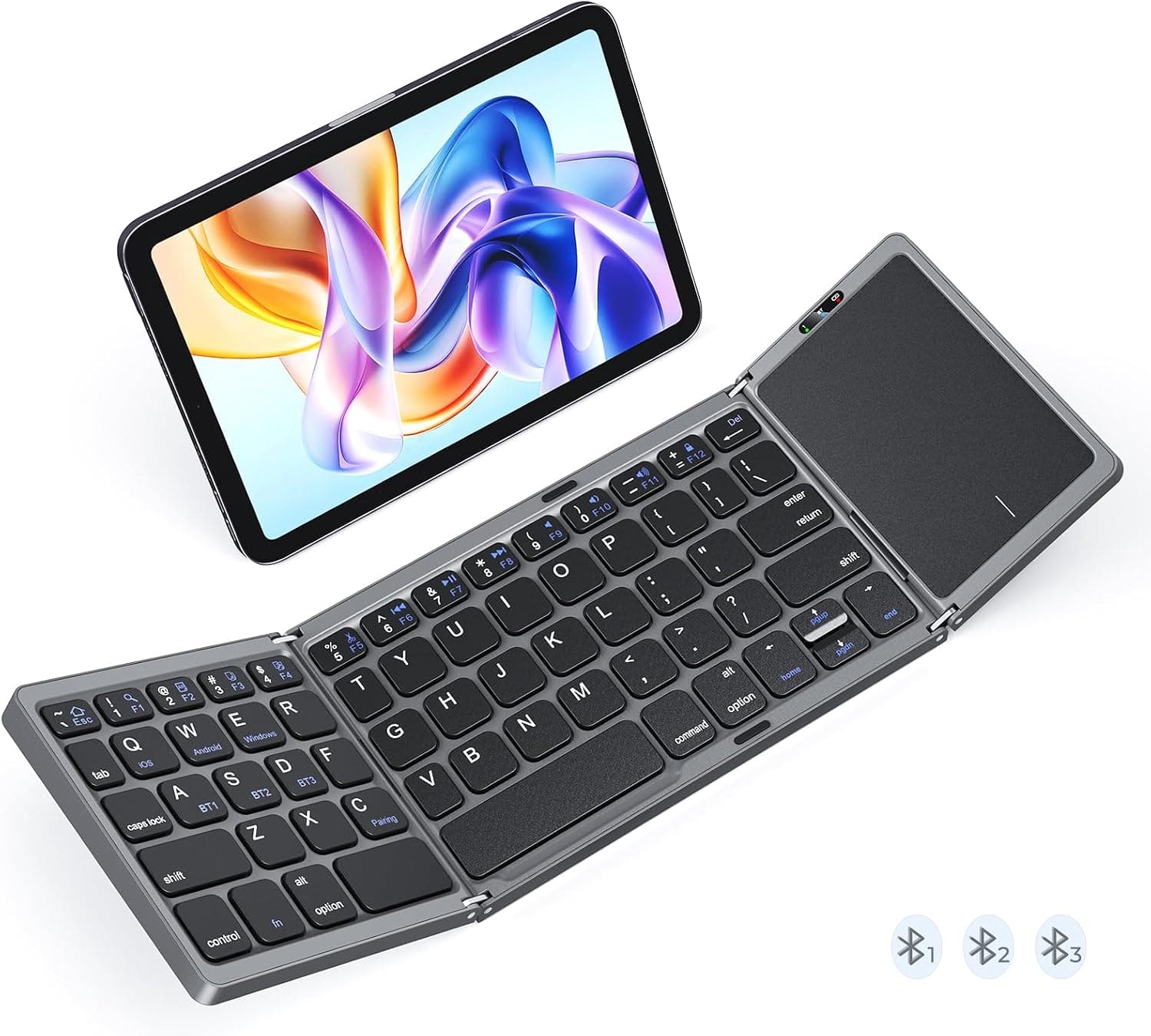
Reviewers call it a great budget option that is portable, well made, and easy to connect to devices. Keys are described as smooth, quiet, and comfortable to type on.
Die 30-Sekunden-Lektüre
Was Kunden gut finden
Reviewers call it a great budget option that is portable, well made, and easy to connect to devices. Keys are described as smooth, quiet, and comfortable to type on.
Der wichtigste Vorbehalt
One reviewer says the mouse pad is "kinda bad," and another notes never knowing whether it has enough charge.
Bevor Sie sich entscheiden
One reviewer says you need to read the instructions carefully, and another highlights its size as a good match for an iPad.
Von einem ähnlichen Produkt mit mehr Bewertungen in dieser Kategorie: Razer Joro Wireless Gaming Keyboard, Portable Compact 75%, Low Profile Keys
Was Kunden gut finden
Reviewers praise the solid build, responsive scissor keys, and stable wired and Bluetooth connections.
Der wichtigste Vorbehalt
One reviewer reports the keyboard sleeps after 5-10 minutes idle, so the first keys typed are missed; battery life without lights is also a concern.
Bevor Sie sich entscheiden
Synapse software needs broad input permissions, and there's no SteamOS version, limiting Fn-lock and key customization on some setups.
Beschreibung
Multi-Touch Trackpad 2 3 Device Connections Auto Sleep Function Universal Type-C port: plug-and-play charging, no cable compatibility issues. Auto-sleep after 10 mins idle; wake via double-tap any key. Abundant Status Indicators Keyboard comes with status indicators: they give real-time device updates, so you can easily track the keyboard’s status for hassle-free use. Fast Switching System With the fn key on the keyboard and the corresponding keys, you can switch the device system with one click, making cross-platform use more efficient. 3 Bluetooth Channel Intuitive Bluetooth operation: clearly labeled keys + shortcut combos enable one-step pairing/channel switching for efficient multi-device use. Previous page Next page 1 On-The-Go Ready 2 Type-C Rechargeable Previous page Next page 1 Café 2 Business 3 There's a problem with my keyboard that I can't solve, what should I do? Does this keyboard sometimes lose connection? Please check the manual and find MEETION support immediately, we will be 100% responsible for each of our products. It enters sleep mode after 20 mins of inactivity (may seem like lost connection). Press any key to wake it and resume use. How to solve the problem of frequent Bluetooth disconnection? 1. Shorten the distance to avoid interference. 2. Check the battery level of the keyboard, and charge it when the battery is low. 3. Delete the paired keyboard, FN+C to re-pair. 4. Make sure the Bluetooth version of your device is ≥5.3. Touchpad not Working? It's Not Responding? Press fn + Spacebar to check if trackpad is off. Check the device battery charge, re-pair via Bluetooth (remove and re-add). For iOS 13.4+: Enable via Settings > Accessibility > Touch > AssistiveTouch. Reboot trackpad and device. Why can't I connect to the computer using the USB cable? The USB cable is for charging, no data transfer function, the connection needs to be completed through Bluetooth. Touchpad lagging or freezing—can it be fixed? 1. Tap any key to wake first, then check if the low-battery light flashes (charge if low). Stay within 10 ft; re-pair if needed. 2. Windows: raise Pointer Speed & disable “Enhance pointer precision.” 3. macOS: Trackpad > Tracking Speed → fast.
Vor- und Nachteile vergleichen
Eine zufällige Auswahl analysierter Produkte aus derselben Kategorie. Unterschiedliche Produkte sind nicht zwangsläufig austauschbar.

Microsoft Surface Pro Keyboard with Slim Pen 2 Bundle for Pro Copilot+ (11th Edition), Pro 9 and Pro 8, Alcantara Material, Black

ProtoArc Foldable Bluetooth Keyboard, XK01 Full-Size Portable Wireless Keyboard for Travel, 105 Keys, 0.65" Keycaps, Multi-Device Sync for iPad Tablet Smartphone Laptop PC Windows iOS Android, Black

MONSGEEK FUN68 Rapid Trigger Gaming Keyboard 8k SP HE Wired 65% Black Keyboard, Glare Magnetic Switch
Belege prüfen
Einbezogen bedeutet nicht als authentisch bestätigt. Markiert bedeutet nicht als Fälschung nachgewiesen. Dies sind analytische Einordnungen.
3 veranschaulichende Auszüge werden angezeigt, nicht der gesamte Rezensionsbestand.
Great Keyboard!
“This key board is perfect size to be comparable with my Ipad. It has a sleek look. The key board is easy to stroke and keys are a good size. This was a great purchase for the cost of the key board. The battery life last for a good time.”
Erkannte Signale: Konkretes Detail: comparison, quantity · Liest sich wie eine authentische Stimme
Great budget keyboard
“Keys feel very smooth and are quiet. Mouse pad is kinda bad but it gets the job done great budget option. Very easily carried around and easily connected to an existing and a new device.”
Erkannte Signale: Konkretes Detail: comparison, scenario · Liest sich wie eine authentische Stimme
Mini Teclado práctico
“El mini teclado es muy práctico, lo instalé para operar mi teléfono, se conectó bien. Hay que leer bien las instrucciones.”
Erkannte Signale: Konkretes Detail: scenario, process · Liest sich wie eine authentische Stimme
Eine Sache weniger zu suchen
Yes — it's built for cross-device flexibility. It pairs via Bluetooth with iPads, iPhones, Android phones and tablets, and Windows/Mac laptops. Many TikTok users specifically praised how quickly it connects to iPads for note-taking. Just remember to read the included instructions for first-time pairing; a few buyers admitted skipping them and getting stuck.
It's functional and handy for basic cursor control, scrolling, and clicking — but it's not a laptop-grade trackpad. Reddit and YouTube reviewers describe it as "good enough" rather than silky-smooth, with occasional cursor jumps. If you mainly need it for light navigation alongside typing, you'll be satisfied; if you expect MacBook-level gestures, temper your expectations.
For the price, it holds up well. The foldable design is lightweight and pocket-friendly, though some users note it feels slightly plasticky and the hinge can loosen with very heavy folding over time. It's ideal for commuters, students, and travelers who want a secondary keyboard — not a rugged, full-time workstation replacement.
Battery life is solid for typical use — most buyers get days to weeks per charge depending on usage. The main gripe is the charge indicator: it's minimal, and several users found it unclear when the device was fully charged. A good tip from reviewers: charge it fully before first use and top it up periodically rather than relying on the light alone.
At this price point, most buyers consider it excellent value for a portable, quiet, multi-device keyboard. Returns depend on the retailer you purchase from, so check the specific return window before buying. If you're a power user needing a premium trackpad or full-size keys, consider stepping up to a Logitech or Apple option — but for casual, on-the-go typing, this one earns its keep.
Von einem ähnlichen Produkt mit mehr Bewertungen in dieser Kategorie: Razer Joro Wireless Gaming Keyboard, Portable Compact 75%, Low Profile Keys
The listing states Bluetooth 5.0 with pairing for up to three devices across Windows, Mac, handhelds, and mobile, with shortcuts to switch between them. Reviews are mixed on wireless reliability: one reviewer reported stable, fast Bluetooth, while others reported connection problems and missed keystrokes after the keyboard sleeps.
The listing describes ultra low-profile switches with quick, precise actuation and satisfying tactile feedback. Reviewers who liked it compared the feel to laptop scissor keys and Apple-style chiclet keys, calling it quiet with good tactile response, though one noted the spacebar is small.
The listing says it weighs 374 g and is 16.5 mm thin with a full function row and full-sized arrow keys. Reviewers described it as sturdy and minimalist, and one noted the static angle is a deliberate trade-off for a keyboard meant to be carried around.
The listing advertises Chroma RGB with 16.8 million colors and dynamic effects. Reviewers reported a glow around the keys rather than through the lettering, secondary symbols that are hard to see, and one said the lighting stayed on while the PC was locked.
The listing ties Snap Tap and Chroma customization to Razer Synapse 4. Reviewers noted that some functions, such as turning off Fn lock to use F1–F12 directly, require Synapse, and one complained there is no Synapse software for SteamOS.
Die Antworten beschränken sich auf das Angebot des Herstellers und die von uns analysierten Rezensionen. Fragen, die diese Quellen nicht abdecken, werden hier nicht beantwortet.
Transparent von Grund auf