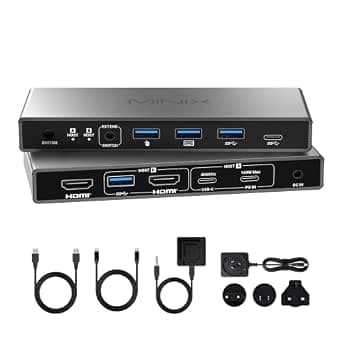
MINIX 8K USB-C+HDMI KVM Switch 1 Monitor 2 Computers for Laptop PC,Aluminum
Beschreibung
【2 Computers 1 Monitor Hub with Desktop Controller】MINIX K2 KVM Switch controls a USB-C laptop and HDMI PC seamlessly with one monitor, keyboard, mouse, and printer. No hotkey/auto-switch to ensure max stability—easily toggle via the physical button or the included desktop controller with one click; 【8K@60Hz Ultra-HD Visual Feast】 Experience breathtaking 8K@60Hz clarity and HDR with the MINIX K2, backward compatible with 4K. Ideal for designers and gamers seeking low latency. [8K Setup Requirements]: Requires an HDMI 2.1 host PC (connected with USB A-to-A cable), an HDMI 2.1 monitor, and certified HDMI 2.1 cables; 【100W PD Pass-Through Charging】The rear panel features a dedicated 100W PD IN port designed strictly for wall charger input (no data transfer, charger not included). When connected, it delivers high-speed pass-through power to your laptop via the Host A USB-C port, keeping your mobile workstation always charged; 【USB-C & HDMI Inputs to 1 Monitor】 Perfect for remote workers and gamers to toggle between an office laptop and a personal PC without messy manual cable swapping. [HOW IT WORKS: 1. Connect laptop via 1x USB-C. 2. Connect PC via 1x HDMI + 1x USB data cable. 3. Plug your ultra-HD monitor into the HDMI output port.; 【Universal OS & Wide Compatibility】 With plug-and-play ease, this cross-platform HDMI and USB C KVM switch integrates with Windows, macOS, Linux and Android without extra drivers. It is widely compatible with MacBook Pro, MacBook Air, laptops, PCs, Nintendo Switch/Switch 2, PS5/4, Xbox, and projectors, making it effortless to share gear; 【Complete Kit & Notes】In Box: 1x K2 KVM, 1x USB C-to-C cable, 1x USB-A data cable, 1x 12V adapter, 1x Desktop controller (HDMI cables NOT included). Notes: 1. NOT compatible with Apple Studio Display. 2. Supports ONLY one HDMI monitor. 3. Device connected to Host A must support full-featured USB-C/TB4. 4. Connect 12V power for high-power USB devices. 5.Wake laptop before switching
Vor- und Nachteile vergleichen
Ähnliche Produkte im direkten Vergleich
Eine zufällige Auswahl analysierter Produkte aus derselben Kategorie. Unterschiedliche Produkte sind nicht zwangsläufig austauschbar.

MLEEDA HDMI KVM Switch 1 Monitors 2 Computers 4K@60Hz,USB KVM Switches for 2 Desktops or Laptops Sharing Single Monitor and Keyboard Mouse Printer,Plug and Play,2 USB Cables Included

HDMI KVM Switch 1 Monitor 2 Computers, 8K60Hz 4K120Hz USB 3.0 2 Port HDMI KVM Switch for 2 PC Management Via 1 Set of Keyboard Mouse and 1 Monitor

UGREEN HDMI KVM Switch 2 Monitors 2 Computers Support 4K@60Hz, 4 Port USB3.0 KVM Switches for 2 Computers Share Keyboard/Mouse/Hard Drives and 2 Monitor, KVM with 2 USB Cables and 4 HDMI Cable
Eine Sache weniger zu suchen
Vor dem Kauf: kurze Fragen
Will this KVM actually charge my laptop while it's connected, or do I still need my own charger?
Yes — the USB-C port supports up to 100W power delivery, so in most cases your laptop will charge right through the KVM while you work. Just make sure your laptop accepts USB-C charging and that you're using a power adapter rated for its needs. Many reviewers specifically called this out as a highlight, saying their laptops stayed topped up all day without a separate dock.
I've had bad luck with KVMs causing black screens or flickering when switching. Does this one handle that smoothly?
That's one of the most common worries we see in Reddit and YouTube discussions, and it's exactly where this unit shines. Thanks to proper EDID handling, switching between computers is quick and the monitor re-detects the signal without the flicker or black-screen delay that plagues cheaper KVMs. Reviewers consistently describe the button switching as "instant" and "reliable."
The listing says 8K — will it really run 4K at 120Hz on my gaming monitor?
Good question, and worth clarifying before you buy. The 8K claim refers to maximum resolution support, but refresh rate depends on your resolution and cable. For 4K@120Hz or 1440p at high refresh rates, you'll want quality HDMI 2.1 or USB-C cables and a compatible GPU/monitor. If you're mainly doing 4K@60Hz or 1440p, you're well within its comfort zone.
Is the aluminum body the real deal, or just a coating? And how durable are the buttons?
It's genuine aluminum, and users notice — the most repeated praise in reviews is how premium and solid it feels compared to the plastic KVMs they've returned. The switching button is designed for repeated daily use, and long-term reviewers report no wear issues after months of regular switching. For a desk accessory you'll touch every day, that build quality matters.
Who is this best suited for — and who should probably look elsewhere?
It's ideal for anyone sharing one monitor between two computers — a work laptop and a personal desktop, for example — along with a keyboard, mouse, and up to four USB peripherals. If you need dual-monitor support, DisplayPort inputs, or simultaneous 8K@60Hz across all ports, you'll want to look at a different model. As one TikTok user put it: "If you've got one screen and two machines, this just works."
Von einem ähnlichen Produkt mit mehr Bewertungen in dieser Kategorie: Verbatim Blu-Ray DVD-Drive 43888 - External - Black
Does this drive work with 4K Ultra HD Blu-ray discs?
Yes. Reviewers report backing up and ripping dozens of 4K UHD Blu-rays with it, and the manufacturer states it supports 4K Ultra HD and BDXL up to 100 GB.
Is it compatible with Windows and macOS?
The manufacturer lists Windows and macOS as supported operating systems, and reviewers describe using it successfully on a Windows 10 laptop, Windows 11 PC, and MacBook.
Do I need extra software to play Blu-ray movies?
Yes. Reviewers note the drive does not play Blu-ray movies straight out of the box and that you must obtain separate playback software, since Windows 11 has no built-in Blu-ray or 4K playback.
How does it connect to a computer?
It uses a USB 3.2 Gen 1 interface and comes with a USB-C to USB-A cable plus a USB-A to USB-C adapter, so it can run off a single USB-C cable.
Is the drive noisy or slow?
Reviewers describe it as relatively quiet in operation but louder when a disc is inserted, and note it is slower than a desktop drive, which they say is expected for slim drives.
Die Antworten beschränken sich auf das Angebot des Herstellers und die von uns analysierten Rezensionen. Fragen, die diese Quellen nicht abdecken, werden hier nicht beantwortet.
Transparent von Grund auf