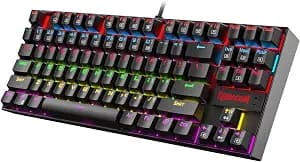
Redragon K552 Mechanical Gaming Keyboard, 87-Key Compact, LED Gaming Keyboard with Red Switches, Anti-Ghosting, Metal Frame for PC Gaming & Typing, Beginner-Friendly (Black)
Beschreibung
🔥𝗧𝗿𝘂𝗲 𝗠𝗲𝗰𝗵𝗮𝗻𝗶𝗰𝗮𝗹 𝗙𝗲𝗲𝗹 𝘄𝗶𝘁𝗵 𝗟𝗶𝗻𝗲𝗮𝗿 𝗥𝗲𝗱 𝗦𝘄𝗶𝘁𝗰𝗵𝗲𝘀 - Experience smooth, consistent keystrokes with linear red mechanical switches designed for rapid actuation and quiet operation. Perfect for both gaming marathons and extended typing sessions without the tactile bump of blue or brown switches.; 🔥𝗩𝗶𝗯𝗿𝗮𝗻𝘁 𝗥𝗮𝗶𝗻𝗯𝗼𝘄 𝗟𝗘𝗗 𝗕𝗮𝗰𝗸𝗹𝗶𝗴𝗵𝘁𝗶𝗻𝗴 𝘄𝗶𝘁𝗵 𝟲 𝗗𝘆𝗻𝗮𝗺𝗶𝗰 𝗠𝗼𝗱𝗲𝘀 - Enjoy eye-catching rainbow backlighting with 6 preset lighting modes, including breathing, wave, ripple, and reactive effects. Note: This Rainbow LED version features fixed color patterns and does not support software customization. Brightness is adjustable via keyboard shortcuts for optimal visibility in any lighting.; 🔥𝗦𝗼𝗳𝘁𝘄𝗮𝗿𝗲 𝗗𝗿𝗶𝘃𝗲𝗿 𝗦𝘂𝗽𝗽𝗼𝗿𝘁 𝗳𝗼𝗿 𝗙𝘂𝗹𝗹 𝗖𝘂𝘀𝘁𝗼𝗺𝗶𝘇𝗮𝘁𝗶𝗼𝗻 𝗖𝗼𝗻𝘁𝗿𝗼𝗹 - Take control of your K552-KR with dedicated software drivers, remap each key, assign complex macro commands, and tailor it perfectly to your personal workflow or gaming style.; 🔥𝗖𝗼𝗺𝗽𝗮𝗰𝘁 & 𝗗𝘂𝗿𝗮𝗯𝗹𝗲 𝟴𝟳-𝗞𝗲𝘆 𝗗𝗲𝘀𝗶𝗴𝗻 𝘄𝗶𝘁𝗵 𝗠𝗲𝘁𝗮𝗹 𝗙𝗿𝗮𝗺𝗲 - The tenkeyless layout saves valuable desk space while maintaining full gaming functionality. Built with a sturdy metal top plate and anti-slip feet, this keyboard stays firmly in place during intense sessions and is ideal for smaller setups or portable use.; 🔥𝗙𝘂𝗹𝗹 𝗔𝗻𝘁𝗶-𝗚𝗵𝗼𝘀𝘁𝗶𝗻𝗴 & 𝗡-𝗞𝗲𝘆 𝗥𝗼𝗹𝗹𝗼𝘃𝗲𝗿 𝗳𝗼𝗿 𝗙𝗹𝗮𝘄𝗹𝗲𝘀𝘀 𝗜𝗻𝗽𝘂𝘁 - Every key press registers accurately with full anti-ghosting technology, ensuring simultaneous commands are executed correctly during competitive gameplay. All 87 keys support N-key rollover for reliable performance when pressing multiple keys at once.; 🔥𝗣𝗹𝘂𝗴 & 𝗣𝗹𝗮𝘆 𝗖𝗼𝗻𝗻𝗲𝗰𝘁𝗶𝘃𝗶𝘁𝘆 𝘄𝗶𝘁𝗵 𝗪𝗶𝗱𝗲 𝗖𝗼𝗺𝗽𝗮𝘁𝗶𝗯𝗶𝗹𝗶𝘁𝘆 - No drivers or software needed – simply connect via the braided USB cable and start typing. Compatible with Windows, macOS, Linux, and most gaming systems, making it a versatile choice for home, office, or school use. Backed by a 1-year warranty for peace of mind.
Vor- und Nachteile vergleichen
Ähnliche Produkte im direkten Vergleich
Eine zufällige Auswahl analysierter Produkte aus derselben Kategorie. Unterschiedliche Produkte sind nicht zwangsläufig austauschbar.

ASUS ROG Strix Scope II 96 Wireless Mechanical Gaming Keyboard – 96% Full-Size, Tri-Mode Connectivity, Hot Swappable Pre-lubed ROG NX Snow Linear Switches, PBT Keycaps, RGB, PC/Mac Support-Black

60 Percent Gaming Keyboard Mechanical with Linear Red Switch, 60% Wired Ultra-Compact Mini Keyboard LED with PBT Keycaps for Ps4/Ps5/Xbox(61 Miami)

YUNZII B68 Wireless Mechanical Keyboard,Tri-Mode BT5.0/2.4GHz/USB-C,Cute PBT Keycaps,Hot Swappable Creamy Typing Gasket Mounted,RGB Backlit NKRO for Win/Mac (Black, Milk V2 Switch)
Eine Sache weniger zu suchen
Vor dem Kauf: kurze Fragen
I'm new to mechanical keyboards and want something for both gaming and typing for college. Is the K552 a good fit?
Absolutely. This is one of the most frequently praised uses for the K552. Its tactile red switches offer a great balance for gaming responsiveness and comfortable typing for long essays. The compact 87-key design saves precious desk space in dorms, and its renowned metal build can withstand the rigors of student life. Many Reddit users call it the "perfect starter mechanical keyboard."
How quiet are the "Red Switches"? I need something for a shared office or quiet bedroom.
It's important to set the right expectation: while "red" switches are not clicky, they are not silent. They produce a discernible clack sound on each keystroke. Many TikTok and YouTube reviewers note they are louder than a standard membrane keyboard. If you or those around you are very sensitive to noise, you might want to look for keyboards specifically marketed with "silent" switches.
Is the build quality really that good for the price? What's the catch?
The overwhelmingly positive sentiment highlights the solid metal top frame and overall sturdiness as its best feature—there's no "catch" on core durability. The trade-offs for the low price are in the features: the LED lighting is a single color (not customizable RGB), the cable is non-detachable, and the included ABS keycaps may develop a shiny finish on heavily used keys over time. It's a tank built for performance, not flashy extras.
I want to customize it with new keycaps. Is that easy to do?
You can replace most keycaps, but there's a key detail to know. The bottom row (Ctrl, Alt, Spacebar, etc.) uses a non-standard layout. This means many standard keycap sets won't include keys that fit those specific positions. It's a common heads-up from the customization community. If swapping keycaps is a major priority, you may want to research sets that support "Redragon bottom row" or consider a keyboard with a standard layout.
Does it work with a Mac, PlayStation, or just Windows PC?
It works seamlessly with Windows PCs. For Mac users, it will function, but the Command and Option keys will be physically labeled as the Windows Start and Alt keys—though they will perform their Mac functions. For PlayStation, it's generally plug-and-play for typing, but game-specific key binding support can vary. The consensus from user reviews is that it's primarily designed and optimized for the Windows PC gaming and typing experience.
Von einem ähnlichen Produkt mit mehr Bewertungen in dieser Kategorie: MechLands AJAZZ AK980 V2 Mechanical Gaming Keyboard with Display Screen, 10000mAh Battery, 98% Wireless Keyboard with BT/USB-C/2.4GHz, Hot Swappable, Linear Switch, Knob, RGB for Win/Mac (Black)
How long does the battery last on the AK980 V2?
The manufacturer states the 10000mAh battery provides about 35 hours with RGB on and 138 hours with RGB off. A customer also noted that it keeps a charge well.
Is the AK980 V2 compatible with Mac?
Yes, the listing says it supports BT/2.4GHz/USB wired connections and works with Windows, Mac, iOS, and Android. However, one reviewer noted the screen-customization software is not compatible with MacOS.
How does the keyboard sound and feel when typing?
Reviewers describe the typing as smooth and comfortable with a satisfying, creamy, "clacky" sound, and one noted there is no bounce in the keys.
What is the polling rate of this keyboard?
The listing states the polling rate is 1000Hz for USB wired and 2.4G wireless, and 125Hz for Bluetooth.
Does the keyboard have RGB backlighting and is it customizable?
Yes, the listing mentions 16.8M RGB backlights, and reviewers praise the many RGB backlight options. One reviewer recommends shine-through, side-print, or clear keycaps for better lighting visibility.
Die Antworten beschränken sich auf das Angebot des Herstellers und die von uns analysierten Rezensionen. Fragen, die diese Quellen nicht abdecken, werden hier nicht beantwortet.
Transparent von Grund auf