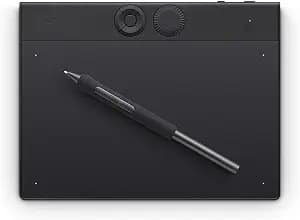
Wacom Intuos Pro Small Bluetooth Professional Graphic Drawing Tablet with Pro Pen 3, Compatible with Mac, Windows - 2025 Edition
Beschreibung
WACOM’S BEST PEN TECHNOLOGY: Pro Pen 3 offers amazing precision, 8192 pressure levels, tilt support & lag-free tracking for smooth, precise strokes; choose slim, straight or flared grip, adjust balance & button layout for precision and comfort; DIAL INTO PRODUCTIVITY: Speed up and stay in the creative flow with 5 customizable tablet ExpressKeys & a mechanical dial conveniently located at the top of the tablet and close to your keyboard for efficiency; DESIGNED FOR MODERN MONITORS: With a versatile 16:9 format perfect for multiple monitors and wide displays; small size has a large active area with a small footprint 8.4” x 6.4” / 215 x 163 mm; SLEEK AND STURDY: Measuring 4mm at its thinnest this professional-grade drawing tablet feels like pen-on-paper on your desk, combined with the robust durability of magnesium making it equally suited for your office or life on the go; WIRELESS FREEDOM: Use Intuos Pro with USB or connect wirelessly via Bluetooth to multiple computers with a simple switch
Vor- und Nachteile vergleichen
Ähnliche Produkte im direkten Vergleich
Eine zufällige Auswahl analysierter Produkte aus derselben Kategorie. Unterschiedliche Produkte sind nicht zwangsläufig austauschbar.

XPPen Wireless Drawing Tablet Deco Pro LW 2nd, 11 Inch Bluetooth Computer Graphics Tablet with X3 Pro Stylus & Mini Key-dial, Digital Drawing Pad for Animation, Digital Art, Video Editing

GAOMON M10K Drawing Tablet, 10x6 inch Large Graphics Tablet with Touch Ring, 8192 Levels Battery-Free Stylus, 10 Hot Keys, Art Tablet for Design, Writing, Editing, Work with Mac, Windows, Android

Drawing Tablet HUION H420X Graphics Drawing Tablet with 8192 Level Pressure Battery-Free Stylus, 4.17x2.6 inch Digital Art Tablet for OSU Game, Design, Teaching, Work with PC, Mac, Linux & Mobile
Eine Sache weniger zu suchen
Vor dem Kauf: kurze Fragen
How does the Pro Pen 3 compare to the Pro Pen 2? Is the upgrade worth it?
The Pro Pen 3 feels noticeably better in hand – it’s better balanced, has customizable nibs (felt, hard, flex), and adds a button near the tip for quick actions. However, some users on Reddit report minor pen jitter on slow diagonal lines that wasn’t present with the Pro Pen 2. If you’re a pro illustrator, the improved ergonomics are a clear win. If you’re upgrading from the previous edition and don’t mind the old pen, the $50 premium might not feel essential.
I keep reading about Bluetooth disconnections. Is that a common problem?
Bluetooth connectivity is generally stable, but a small but vocal minority on forums report occasional drops, especially in USB 3.0-heavy environments or with certain laptops. Many TikTok users recommend using the included USB cable for critical work to avoid mid-stroke interruptions. If you’re primarily wireless, keeping the tablet close to your computer (within 3 feet) and updating drivers significantly reduces issues.
Is the Small size actually usable for professional illustration work?
For quick sketches, note-taking, or photo editing, the Small is perfectly capable. However, professional illustrators on YouTube warn that the active area (about 7 x 5 inches) feels cramped for full-page compositions or broad arm movements. Many regret buying Small and suggest the Medium if you’re doing more than occasional hobby work. It’s best suited for travel, desk-limited spaces, or as a secondary tablet.
Can I use this tablet without installing drivers, and does it work with my software?
The tablet works plug-and-play for basic mouse functions and low-pressure stylus input on both Mac and Windows. For full pressure sensitivity, tilt, and ExpressKey customization, Wacom’s driver software is required. It’s compatible with every major creative app (Photoshop, Illustrator, Clip Studio Paint, Krita, etc.). Some Windows users report initial driver headaches – uninstalling old Wacom drivers and rebooting before installing the new ones usually solves it.
How does it compare to screen-based tablets like the Huion Kamvas or iPad?
The Wacom Intuos Pro Small is a pen tablet (no screen), which takes time to get used to – you draw while looking at your monitor. That’s a dealbreaker for some, while others prefer the arm-friendly posture and reduced glare. Alternatives like the Huion Kamvas 13 offer a built-in display for roughly the same price, and the iPad with Procreate gives you standalone mobility. On the upside, Wacom’s build quality and driver reliability (once set up) are industry standards. This tablet is best for users who want a durable, portable, lag-free input device and are comfortable with the “draw on one surface, look at another” workflow.
Von einem ähnlichen Produkt mit mehr Bewertungen in dieser Kategorie: Anker USB A to USB C Cable, USB to USB C Cable (2-Pack, 6 ft, Black)
Is this cable compatible with fast charging?
It supports fast charging up to 15W (3A/5V) and Qualcomm Quick Charge, but it is not compatible with Power Delivery and does not support laptop charging.
How long is the cable and is that length practical?
It is 6 ft long, and reviewers say this gives enough room to use it in the car, at a desk, next to the bed, or with a wall charger without feeling too short.
Is the cable durable?
Reviewers describe it as sturdy, well-made, and more durable than basic rubber cables, with a braided nylon exterior that resists wear and tangling.
Does it support data transfer, and at what speed?
Yes, it supports data transfer speeds up to 480Mbps, and reviewers confirm it works for transferring data as well as charging.
Is this a USB 3.0 cable?
No, it is a USB 2.0 cable, as noted in the product specifications and pointed out by a reviewer.
Die Antworten beschränken sich auf das Angebot des Herstellers und die von uns analysierten Rezensionen. Fragen, die diese Quellen nicht abdecken, werden hier nicht beantwortet.
Transparent von Grund auf