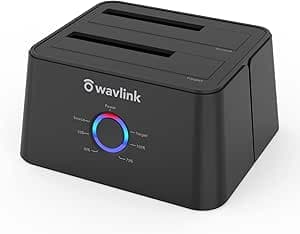
WAVLINK USB 3.0 and USB C to SATA Dual-Bay External Hard Drive Docking Station for 2.5/3.5 Inch HDD/SSD with UASP (6Gbps), Support Offline Clone/Duplicator Function [16TB X2 ]-Black
Beschreibung
Support USB 3.0 external, SATA-I/II/III internal; Works great with 2.5 inch and 3.5 inch SATA HDD/SSD.; Support transfer speeds up to 6Gbps by UASP transfer protocol, which is up to 20% faster than USB 3.0. Speeds up to 5Gbps (USB 3.0),480Mbps (USB 2.0), 12Mbps (USB 1.1); Support Offline Cloning up to 60Mbps. No drivers needed, easy installation; Offline clone is from source disk to target disk, make sure the capacity of target disk is larger or equivalent to that of source disk; not support online Clone; Built-in Power Control Switch; Highly efficient (12V, 3A), stable and reliable DC power source a steady supply of energy; Automatic sleep mode after 30 minutes of inactivity saves energy.; Tool-free installation on Windows 10 through XP, Mac OS X (not compatible with M1/M2-based Mac), and Linux / Unix, Support hot-swapping and easy set up.(No drivers are required for the disk dock itself as it uses the standard USB Mass Storage class)
Vor- und Nachteile vergleichen
Ähnliche Produkte im direkten Vergleich
Eine zufällige Auswahl analysierter Produkte aus derselben Kategorie. Unterschiedliche Produkte sind nicht zwangsläufig austauschbar.

M.2 NVMe & SATA SSD/HDD Hard Drive Docking Station, ICY BOX USB-C 10Gbps NVMe Cloner&Reader, TripleBay Hard Drive cloner for 2.5"/3.5" SSD&HDD Hard Drives, Offline Cloning, Tool-Free (3 Bay)

SABRENT USB 3.0 to SATA External Hard Drive Lay-Flat Docking Station for 2.5 or 3.5in HDD, SSD [Support UASP] (EC-DFLT)

CENMATE Aluminum 8 Bay Hard Drive RAID Enclosure with Cooling Fan for 2.5“/3.5" SATA HDD/SSD with USB A/C 3.0, Tool-Free HDD Enclosure, 8 Modes
Eine Sache weniger zu suchen
Vor dem Kauf: kurze Fragen
Is the offline clone function reliable, and are there any tips to make it work successfully?
The offline duplicator is a major benefit for many users, allowing you to clone one drive to another without a computer. For best results, ensure the source drive is smaller than the target drive, and that both are securely seated. Some Reddit users recommend doing a quick format of the target drive first if you encounter errors. While generally praised, it's always wise to have a backup of critical data before any cloning operation.
I use a modern Mac (Apple Silicon). Will this docking station work without issues?
It is compatible, but "plug and play" can vary. The dock itself will work, but macOS may not write to drives formatted in NTFS (Windows) without additional software. For full read/write functionality, you may need to reformat drives to a macOS-compatible format (like APFS or ExFAT) or use a trusted third-party NTFS driver. Many TikTok creators in the tech space have shared quick tutorials on this setup.
How is the build quality and cooling? I've seen comments about units getting hot or failing.
The dock offers great value, but build quality can vary. The casing is plastic and it relies on passive cooling. During prolonged, heavy transfers or cloning sessions, it's common for the unit and drives to become warm. For optimal performance and longevity, ensure it's used in a well-ventilated area. Several YouTube reviewers suggest placing it upright to improve airflow if you're planning extended use.
What's the real-world speed I can expect, and does it support using just one bay?
With UASP support over USB 3.0 or USB-C, you can achieve significantly faster transfer speeds than standard USB 3.0, especially for large files. Actual speed depends on your drives (HDD vs. SSD). And yes, you can absolutely use just one bay at a time—it's perfect for accessing a single drive from an old laptop or desktop.
Who is this docking station best suited for, and who might want to consider an alternative?
This dock is an excellent fit for tech-savvy users, PC builders, and IT hobbyists who need an affordable tool for drive management, backups, and occasional cloning. If you need flawless Mac compatibility out of the box, require industrial-grade durability for constant use, or prefer a unit with active cooling, you might consider brands like OWC or Sabrent, which cater to those specific needs at a higher price point.
Von einem ähnlichen Produkt mit mehr Bewertungen in dieser Kategorie: WAVLINK Dual Bay Hard Drive Docking Station - USB 3.0 to SATA I/II/III for 2.5" & 3.5" HDD/SSD with Fixed Bezel, Supports Offline Clone/Duplicator Function, Supports 2x20TB with UASP 6Gbps - Black
Can I use both hard drives at the same time, or does the dock switch between them?
Yes, you can access both drives simultaneously.
Does the offline clone function require a computer?
No, offline data copy works between two hard drives with no computer involved; press the Clone button for about 5 seconds to start the process, and make sure the target disk's capacity is larger than or equal to the source disk's.
Is the power supply compatible with 230V AC?
Yes, it supports 100-240V AC.
Does it include a USB-C adapter?
Yes, it includes a USB-A to USB-C adapter.
Is the dock easy to set up and use?
Reviews describe it as easy to set up and working perfectly, and the listing notes it is tool-free, requires no driver, and is plug and play.
Die Antworten beschränken sich auf das Angebot des Herstellers und die von uns analysierten Rezensionen. Fragen, die diese Quellen nicht abdecken, werden hier nicht beantwortet.
Transparent von Grund auf