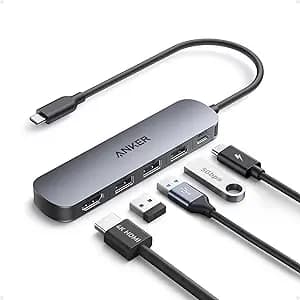
Anker USB C Hub 5-in-1 USB Hub for Laptops, 4K HDMI USB-C Multiport Adapter | 90W Max Power Delivery, 3 USB A Data Ports USB C Dongle, Compact for MacBook, Dell, and More (Charger Not Included)
Description
5-in-1 USB-C Hub: Experience comprehensive connectivity featuring a Power Delivery input, two USB-A 2.0 ports, a USB-A 3.0 port, and an HDMI port. (Note: The USB-C power delivery input port is only for connecting an external wall charger to power your laptop and cannot power peripheral devices.); 90W Pass-Through Charging: Achieve optimal charging with 90W pass-through power to your laptop, supported by a total input of 100W, with the hub reserving 10W for operational efficiency. (Note: Wall charger not included.); Quick Data Transfers: Accelerate your productivity with rapid data transfers using a high-speed 5Gbps USB 3.0 port and two 480Mbps USB 2.0 ports.; 4K HDMI Display: Enhance your visual experience with a hub capable of delivering 4K resolution at 30Hz in both mirror and extend modes. Please note that this hub is compatible with MacBook (macOS 12 and newer), Windows 10 and 11, ChromeOS, and laptops equipped with DP Alt Mode and Power Delivery. Note: This device is not compatible with Linux.; What You Get: Anker USB-C Hub (5-in-1, 4K HDMI), welcome guide, 18-month warranty, and our friendly customer service.
Compare the trade-offs
Similar products, side by side
A random selection of analyzed products from the same category. Different products are not necessarily interchangeable.

40B00135US Lenovo Thinkpad Docking Station USB C - 1 Year Warranty, Supports 4K Display, Thunderbolt 4 Dock with 135W Adapter, HDMI, DisplayPort, Thunderbolt Cables & Cloth - Lenovo Docking Station

Acer 13-in-1 Laptop Docking Station, USB-C 3 Display Docking (2 HDMI+1 DP)

RayCue USB C Docking Station, 13-Port Dual 4K Display Laptop Docking Station with 160w Max USB-C Output, 2.26''LCD Smart Display, 10Gbps USB A/C Ports,Ethernet Ports for macOS and Windows
One less thing to search
Before you buy: quick questions
Does this hub support 4K at 60Hz, or is it limited to 30Hz?
The Anker 5-in-1 USB-C Hub outputs 4K video at 30Hz, which is smooth for presentations, web browsing, and media playback. If you need 4K at 60Hz for gaming or video editing, we suggest looking at a Thunderbolt dock—it’s a different class of hardware. Many TikTok reviewers noted the 30Hz limit is fine for productivity but not ideal for fast-paced work.
I plug in two USB drives, but they don’t both fit. Is this normal?
Yes—the three USB-A ports are positioned close together. Standard-sized flash drives work fine, but wider drives or those with bulky casings may block an adjacent port. This is a common complaint on Reddit. A simple fix: use a short USB extension cable for one of the drives, or opt for a slimmer flash drive model.
My laptop charges slowly with this hub. Is it actually 90W Power Delivery?
The hub supports 90W Power Delivery input, but about 5W is used to run the hub itself. So your laptop receives up to 85W—plenty for most ultrabooks (MacBook Air, Dell XPS, etc.). Some users on YouTube tested this and found their laptops charged slightly slower than with a direct charger. If your laptop requires 100W, you may notice the difference. The hub does not include a charger, so make sure your USB-C power adapter is rated for at least 65W (90W recommended).
Will this work with my MacBook Pro M3 or Dell XPS 13?
Yes, it’s compatible with all USB-C laptops, including MacBook Pro/Air (M1, M2, M3) and Dell XPS 13/15. It also works with Chromebooks, iPad Pro (USB-C models), and some Android tablets. Plug-and-play—no drivers needed. A few users on TikTok noted it works with the Nintendo Switch in dock mode, but Anker doesn’t officially guarantee that.
The hub gets hot during use—is that dangerous?
It’s normal for this hub to feel warm after extended use, especially when you’re charging your laptop and outputting 4K video at the same time. The metal casing acts as a heat sink. If it becomes uncomfortably hot (unlikely), disconnect and let it cool. This is a common observation among lengthy Reddit threads—users say it’s “warm, not alarming.” For peace of mind, make sure the hub is on a hard, flat surface (not a bed or pillow) to help with airflow.
From a similar, more-reviewed product in this category: USB C Laptop Docking Station Dual Monitor HDMI USB C Hub Multiport Adapter
Will this docking station work with my laptop?
It is compatible with laptops that have a full-featured USB-C port supporting DisplayPort, charging, and data transfer, such as Thunderbolt 3/4/5 or USB-C 3.2 Gen 1/Gen 2 with Power Delivery and DisplayPort. Not all USB-C devices are compatible, and incompatible devices cannot use the HDMI, DP, or VGA ports.
Can I use it with multiple monitors?
It supports dual monitors and triple displays for Windows, with single HDMI 1 or DisplayPort up to 4K@60Hz and HDMI 2 up to 4K@30Hz. MacBook laptops only support the same image on external monitors.
Does it charge my laptop while I use the other ports?
Yes, it has a 100W USB-C Power Delivery port, but the safe power out is limited to 87W, and about 8W is allocated to the hub itself. A power charger and cable are not included, and at least a 65W adapter is recommended.
Do reviewers find it reliable?
Experiences vary: one reviewer said it disconnects or does not work off and on and that the insides came apart, while another said bumping it can make the monitor go black for a second or two. Others reported it works well, including one who bought a second one.
Does it get hot during use?
One reviewer noted it gets a little warm, and the listing states the hub will heat up when it works, with 0℃–50℃ being the normal and reasonable range.
Answers are limited to the manufacturer's listing and the reviews we analysed. Questions those sources cannot support are not answered here.
Transparent by design