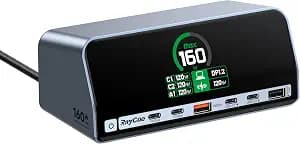
RayCue USB C Docking Station, 13-Port Dual 4K Display Laptop Docking Station with 160w Max USB-C Output, 2.26''LCD Smart Display, 10Gbps USB A/C Ports,Ethernet Ports for macOS and Windows
Description
【13-in-1 Laptop Docking Station】Raycue laptop docking station is equipped with 160W max output, 3 *100W USB-C ports, 1*USB-A PD port, 2*4K60 HDMI ports,2 *USB-C port and 1*USB-A ports supporting 10Gbps data transfer, USB-A 2.0 port, Gigabit Ethernet, Button press, perfect for charging, transferring data quickly, and managing dual displays; 【160W Ultra-Fast Docking Station】Deliver a powerful charge with 160W of total output, capable of charging up to four devices simultaneously through three USB-C ports at 100W max each and one USB-A port at 12W max.; 【Dual Display for Windows and macOS】Power up 2 external monitors at once,extending your display in stunning 4K60 resolution through the 2 HDMI ports. Compatible with both macOS and Windows.; 【Smart Screen Display & Screen-lock Button】View real-time updates on charging power, display performance, the connection status of each port. Use the screen-lock button to secure sensitive information whenever needed; 【10Gbps Ultra-Fast Data & Gigabit Ethernet】This usb c docking station achieves up to 10Gbps data transmission speed with its USB 3.2 Gen 2 ports (2 USB-C and 1 USB-A), enabling you to transfer 20GB files in just 20 seconds.Laptop docking station ensures a fast and secure transfer experience.This powerd docking station 1000Mbps ethernet port download movies quickly and reduce game lag; 【Compatibility】Supports USB-C, USB4, and Thunderbolt connections. Compatible with Windows 10 and 11, ChromeOS,MacOS, and laptops that support DP Alt Mode and Power Delivery.
Compare the trade-offs
Similar products, side by side
A random selection of analyzed products from the same category. Different products are not necessarily interchangeable.

ACASIS Dual DP DisplayLink Adapter for M1/M2/M3/M4 MacBook Air/Pro

MOKiN USB C Splitter for Dual Monitors 4K@60Hz DP Alt Mode for Laptops

USB C Adapter HDMI Hub for MacBook Pro/Air M5 M4 M3 M2 M1 2025-2018 13" 15" 16", Mac USB C Hub Adapter 7-in-2, MacBook Accessories Dongle with HDMI, Thunderbolt 3, USB C&A Data Ports, 3.5mm Audio
One less thing to search
Before you buy: quick questions
Will this docking station run two 4K monitors at 60Hz on my MacBook Air M2?
Yes, it supports dual 4K@60Hz on any M1, M2, or M3 Mac that uses USB-C or Thunderbolt. However, some Windows users report needing to update their graphics drivers for the monitors to recognize the dock. We recommend testing with your specific monitor model within 30 days to confirm compatibility.
The specs say "160W max"—how much power will my laptop actually get?
The 160W is the total available power across all ports. Your laptop will receive up to 100W via USB-C Power Delivery, with the remaining 60W shared among other connected devices. For high-demand laptops like the Dell XPS 15 (requiring 130W), you may still need your original charger for full performance.
Several reviews mention the cable is too short. What's the actual length, and can I use an extension?
The attached cable is 11.8 inches (30 cm) from dock to connector—standard for compact docks but tight if your laptop is far away. Using a high-quality USB-C 3.2 Gen 2 extension cable works for most users, though we recommend keeping the total cable run under 3 feet to avoid data speed loss.
I've heard this dock can get hot during heavy use. Should I be worried about damage?
The aluminum body acts as a heat sink, so it will get warm to the touch after hours of high-speed charging or video editing—this is normal thermal management. In rare cases where the dock becomes hot to the point of discomfort, simply ensure it has airflow (don't pile papers on it). Overheating is not a reported cause of failure in the majority of units.
How does this compare to the CalDigit TS4, which costs twice as much?
The RayCue offers better value for most users—same dual 4K@60Hz support, faster 10Gbps USB ports, and a unique LCD display for real-time stats, all at half the price. The CalDigit runs a bit cooler during heavy loads and has a longer cable, but it lacks the LCD screen. For non-professional use, the RayCue is the smarter buy; for 24/7 server-rack work, the CalDigit may be worth the premium.
From a similar, more-reviewed product in this category: USB C Laptop Docking Station Dual Monitor HDMI USB C Hub Multiport Adapter
Will this docking station work with my laptop?
It is compatible with laptops that have a full-featured USB-C port supporting DisplayPort, charging, and data transfer, such as Thunderbolt 3/4/5 or USB-C 3.2 Gen 1/Gen 2 with Power Delivery and DisplayPort. Not all USB-C devices are compatible, and incompatible devices cannot use the HDMI, DP, or VGA ports.
Can I use it with multiple monitors?
It supports dual monitors and triple displays for Windows, with single HDMI 1 or DisplayPort up to 4K@60Hz and HDMI 2 up to 4K@30Hz. MacBook laptops only support the same image on external monitors.
Does it charge my laptop while I use the other ports?
Yes, it has a 100W USB-C Power Delivery port, but the safe power out is limited to 87W, and about 8W is allocated to the hub itself. A power charger and cable are not included, and at least a 65W adapter is recommended.
Do reviewers find it reliable?
Experiences vary: one reviewer said it disconnects or does not work off and on and that the insides came apart, while another said bumping it can make the monitor go black for a second or two. Others reported it works well, including one who bought a second one.
Does it get hot during use?
One reviewer noted it gets a little warm, and the listing states the hub will heat up when it works, with 0℃–50℃ being the normal and reasonable range.
Answers are limited to the manufacturer's listing and the reviews we analysed. Questions those sources cannot support are not answered here.
Transparent by design