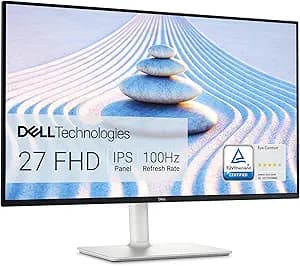
Dell S2725HS 27 Inch Monitor, FHD (1920x1080) Display, 100Hz Refresh Rate, 1500:1 Contrast Ratio, TÜV Rheinland Eye Comfort 4 Star, Integrated 2x5W Speaker, Height/Tilt/Swivel/Pivot- Ash White Color
Description
A 27-inch FHD monitor that optimizes eye comfort and features impressive visuals with outstanding acoustics in a lifestyle-inspired design. With clear FHD resolution, high 100Hz variable refresh rate, integrated dual 5W speakers and subtle texture on the back inspired by Japanese sand raking, any activity becomes an immersive experience.
Compare the trade-offs
Similar products, side by side
A random selection of analyzed products from the same category. Different products are not necessarily interchangeable.

10.3 Inch Small Touchscreen Monitor, 400cd/m², IPS Stretched Bar LCD Mini Travel Touch Display 1920 * 720 HDMI USBC, Portable Touch Screen for Laptop Computer Windows Aida64 GPU CPU RAM Monitoring

Samsung 32" ViewFinity S7 (S71H) 4K UHD IPS HDR10 High Resolution Monitor

GeeekPi 7-Inch Screen for Raspberry Pi, 1024x600 IPS LCD Display, HDMI Portable Monitor for Pi 5/4B/3B+/3B, Win11/10/8/7, Free-Driver
One less thing to search
Before you buy: quick questions
I use a MacBook Pro. Will I get the full 100Hz refresh rate and all the features, or is this monitor better suited for Windows?
You can plug in a USB-C/HDMI adapter and the monitor will work perfectly for display and the ergonomic adjustments. However, we want to be upfront with you: several Mac users have told us that certain features—specifically the 100Hz refresh rate—are locked unless you're running Windows. If you're using a MacBook exclusively, you'll likely be capped at 60Hz. If you're a Mac user who *needs* that extra smoothness, you might find the limitations frustrating, as we've seen in several teardown forums. For a Mac-centric setup, you may want to check out monitors with native USB-C support and Mac-specific compatibility.
Is the color accuracy good enough for photo editing, or will it come out of the box looking washed out?
We get this question a lot, and the honest answer is: be prepared to tweak the settings. The factory defaults are set for office brightness, which means colors can look a bit flat and cool-toned right out of the box. However, the panel itself is solid. Many users on Reddit report that after spending just 10 minutes adjusting the color temperature and contrast, the screen becomes quite reliable for light photo work or graphic design. If you require professional, factory-calibrated accuracy for paying clients, you might want to invest in a dedicated colorimeter or look at higher-end pro monitors, but for general content creation and daily use, it hits a great balance.
How are the built-in speakers for daily use? Do I still need to buy external ones?
The consensus from user reviews is that these are genuinely "good for monitor speakers." They are noticeably better than the tinny audio you find on most displays—crisp enough for conference calls, YouTube videos, and casual background music. That said, the 5W drivers lack bass and will distort at maximum volume. For a dedicated movie night or music production, you'll definitely want external speakers or a headset. But for a clean desk setup where you want to minimize clutter for work calls and office tasks, you can leave them off the shopping list.
I have a small desk, is the stand too big? Can I mount it hoping it’s compatible with my VESA arm?
The monitor itself has a slim profile and thin bezels, which is great for tight spaces. The main thing to note is the *depth* of the stand base—it’s quite deep to support the height-adjustable arm. A couple of reviewers mentioned it makes fitting a full-size keyboard and mouse a tight squeeze on narrower 100cm desks. If that sounds problematic, rest assured it is VESA mount compatible (100x100mm), so you can easily swap out the stand for an aftermarket monitor arm and gain all your desk space back while keeping the excellent ergonomic tilt and swivel functions.
The 100Hz refresh rate sounds like a gamer monitor, but I’m just an office worker. Is there a benefit for me, or is this overkill?
While it does give casual gaming a smooth edge, the 100Hz isn't just for play. For office work, the benefit is in reducing eye strain—scrolling through long documents, moving windows around, and even moving your mouse pointer all feel noticeably smoother and more fluid than on a standard 60Hz monitor. When you combine that with the TÜV Rheinland Eye Comfort 4-star rating, it makes those long 9-to-5 workdays easier on your eyes. Essentially, it’s less about "gaming performance" and more about overall comfort and a premium feel to your daily workflow.
From a similar, more-reviewed product in this category: KOORUI 24 Inch Gaming Monitor, 180Hz 1080P VA Display with 3000:1 Contrast
Does this monitor really run at 180Hz, and what do I need to enable it?
Yes — it's a native 180Hz panel, but you'll need to switch it on manually. Connect via the included HDMI cable (or a DisplayPort-capable setup), then set 180Hz in your GPU's display settings; it defaults to a lower refresh rate out of the box. Many Reddit and YouTube users note that enabling Adaptive Sync/FreeSync alongside it gives the smoothest experience, and it works with both AMD and NVIDIA cards.
How does the VA panel perform for gaming and everyday work?
The 3000:1 contrast gives noticeably deeper blacks than typical IPS budget monitors, which shines in dark game scenes and movies. For fast-paced competitive shooters, some TikTok and Reddit users mention mild ghosting/smearing in dark transitions — it's great for casual gaming, students, and office work, but color-critical creators or hardcore FPS players may prefer an IPS panel.
The stand looks basic — can I adjust the height or mount it?
Correct, the included stand only tilts (-5° to 20°) and doesn't offer height, swivel, or pivot adjustment, and a few users find the base slightly wobbly. The good news: it's VESA 100×100mm compatible, so a monitor arm or desk mount solves ergonomics entirely — a popular fix among dual-monitor and dorm-room setups.
What if I receive a unit with a dead pixel or backlight bleed?
Budget monitors can vary unit to unit, and some buyers report stuck pixels or corner bleed — but KOORUI backs it with a 3-year manufacturer warranty. If your unit arrives defective, contact the seller for a replacement or refund promptly; most users who did so report a smooth resolution, so inspect the screen within the return window.
Is it good value, and who is it best suited for?
At around $120, it's widely praised as one of the best budget 180Hz options — ideal for students, casual gamers, home-office users, and compact or dual-monitor setups. Just set expectations: no built-in speakers, a single HDMI plus VGA, and basic ergonomics. If you need height adjustment, color accuracy, or built-in audio, consider spending more on an IPS alternative.
Answers are limited to the manufacturer's listing and the reviews we analysed. Questions those sources cannot support are not answered here.
Transparent by design