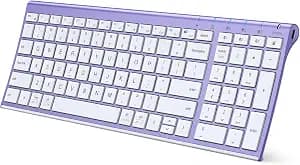
iClever BK10 Bluetooth Keyboard Quiet Typing Multi-Device USB-C Rechargeable – Slim Wireless Keyboard for Mac Windows iPad Office
Description
Multi-Device Pairing with Instant Switching: Easily connect up to 3 devices via Bluetooth and switch between them with a single tap. Compatible with macOS, iOS, Windows, and Android—automatically detects the correct layout for each system.
Compare the trade-offs
Similar products, side by side
A random selection of analyzed products from the same category. Different products are not necessarily interchangeable.

ProtoArc Foldable Bluetooth Keyboard, XK01 Full-Size Portable Wireless Keyboard for Travel, 105 Keys, 0.65" Keycaps, Multi-Device Sync for iPad Tablet Smartphone Laptop PC Windows iOS Android, Black

iClever BK08 Foldable Keyboard with Touchpad for Phone and Tablet, Gray

Dell Keyboard Smartcard USB
One less thing to search
Before you buy: quick questions
How quiet is this keyboard really, and is it suitable for a shared office or library?
It's exceptionally quiet. The low-profile scissor-switch keys produce a soft, muted sound, not the loud clack of mechanical keyboards. In social listening, it's consistently praised by students and remote workers for not disturbing others—perfect for libraries, open offices, or late-night typing sessions.
I switch between my MacBook, iPad, and Windows PC daily. How seamless is the multi-device connectivity?
Seamless switching is a top-rated feature. With three dedicated Bluetooth channels, you can pair each device once and then switch between them instantly with the press of a button. While most users report flawless operation, a small number note occasional re-pairing needed with non-standard devices. For typical Apple/Windows setups, it's highly reliable.
What's the real-world battery life, and is the backlighting adjustable?
The battery life is outstanding. With typical daily use (backlight off), a single USB-C charge can last several months. Using the backlight consistently will reduce this time. Note that the backlight is a fixed white color with a single on/off state—it's not RGB and doesn't have adjustable brightness levels, which some Reddit users have noted is a trade-off for the price.
Some reviews mention keycap wear. How durable is the build quality over time?
The keyboard is built to be a reliable, slim workhorse. The primary structure is durable plastic, keeping it lightweight. The keycaps are generally resilient, but a minority of heavy users have reported the printed legends on the most frequently used keys can show wear after 6+ months of intensive typing. If you're a very heavy typist, this is a consideration.
Who is this keyboard best for, and who might want to look at an alternative?
It's ideal for students, hybrid workers, and anyone needing a quiet, portable, multi-device keyboard with fantastic battery life. It's a terrific value-for-money daily driver. However, if you prioritize a heavy, metal build, customizable RGB lighting, or a true mechanical switch feel, you might consider alternatives like the Logitech MX Keys (premium build) or a Keychron board (mechanical feel).
From a similar, more-reviewed product in this category: Razer Joro Wireless Gaming Keyboard, Portable Compact 75%, Low Profile Keys
Does the Razer Joro work wirelessly with Bluetooth, and how many devices can it pair with?
The listing states Bluetooth 5.0 with pairing for up to three devices across Windows, Mac, handhelds, and mobile, with shortcuts to switch between them. Reviews are mixed on wireless reliability: one reviewer reported stable, fast Bluetooth, while others reported connection problems and missed keystrokes after the keyboard sleeps.
How does the keyboard feel to type and game on?
The listing describes ultra low-profile switches with quick, precise actuation and satisfying tactile feedback. Reviewers who liked it compared the feel to laptop scissor keys and Apple-style chiclet keys, calling it quiet with good tactile response, though one noted the spacebar is small.
Is the Razer Joro actually portable and well built?
The listing says it weighs 374 g and is 16.5 mm thin with a full function row and full-sized arrow keys. Reviewers described it as sturdy and minimalist, and one noted the static angle is a deliberate trade-off for a keyboard meant to be carried around.
What are the complaints about the RGB lighting?
The listing advertises Chroma RGB with 16.8 million colors and dynamic effects. Reviewers reported a glow around the keys rather than through the lettering, secondary symbols that are hard to see, and one said the lighting stayed on while the PC was locked.
Do I need Razer Synapse software to use all the keyboard's features?
The listing ties Snap Tap and Chroma customization to Razer Synapse 4. Reviewers noted that some functions, such as turning off Fn lock to use F1–F12 directly, require Synapse, and one complained there is no Synapse software for SteamOS.
Answers are limited to the manufacturer's listing and the reviews we analysed. Questions those sources cannot support are not answered here.
Transparent by design