What people like
Solid, versatile dock for handhelds
Several reviewers report the dock feels durable and versatile, with all functions working reliably for their handheld-to-TV setups.

Our buying verdict
Several reviewers report reliable, durable docking, but some hit HDMI/HDR or lag issues.
Buyers wanting a durable, versatile dock for handheld gaming devices connected to a TV, who can adjust TV settings if needed.
Buyers who need plug-and-play TV output without troubleshooting HDMI, HDR, or lag issues.
The 30-second read
What people like
Several reviewers report the dock feels durable and versatile, with all functions working reliably for their handheld-to-TV setups.
The main watch-out
Two reviewers report TV connection problems: one had no sound through the TV, another needed to disable HDR to get it working.
Before you choose
One reviewer found not all HDMI protocols are compatible, so check your TV's settings and connection before relying on it.
From a similar, more-reviewed product in this category: USB C Laptop Docking Station Dual Monitor HDMI USB C Hub Multiport Adapter
What people like
Reviewers value the wide port selection (HDMI, DisplayPort, VGA, Ethernet, SD, USB-A, headphone jack) and report it works reliably across Lenovo, HP, Microsoft, and Asus laptops, with some buying a second unit.
The main watch-out
Some users report the monitor going black when bumped, intermittent disconnects, or the internals sliding out of the case, and one Lenovo laptop would not boot while connected.
Before you choose
Compatibility varies by laptop model, and some users note the dock gets warm or has a shorter cable, so confirm your specific setup and required ports before buying.
Description
100W Charging Power 2 1000Mbps Ethernet 3 Versatile Modes 4 SD/TF Expand 5 10Gbps USB 3.2 Previous page Next page 1 Refine Your Gaming Area 2 Easy to Carry 3 Multi-Purpose iVANKY Gaming Dock Series 14-in-1 RGB Gaming Dock Add to Cart 14-in-1 Dock+100W Adapter Buying Options 8-in-1 Steam Deck Dock Buying Options 8-in-1 Rog Ally Dock Buying Options Rog Ally Dock+65W Adapter Add to Cart Steam Deck Dock+100W ADP Buying Options Customer Reviews 4.3 out of 5 stars 567 4.5 out of 5 stars 302 4.3 out of 5 stars 1,678 4.4 out of 5 stars 127 4.4 out of 5 stars 127 4.3 out of 5 stars 1,678 Price $49.99$49.99 $99.99$99.99 $26.99$26.99 $32.99$32.99 $79.99$79.99 — Ports 12 12 6 6 6 6 HDMI 4K@120Hz 4K@120Hz 4K@144Hz 4K@144Hz 4K@144Hz 4K@144Hz 100W Charge ✔ ✔ ✔ ✔ ✔ ✔ 1Gbps Ethernet ✔ ✔ ✔ ✔ ✔ ✔ Fits ROG Xbox Ally X ✔ ✔ ✘ ✔ ✔ ✘ Fits Steam Deck LCD/OLED ✔ ✔ ✔ ✔ ✔ ✔ Fits ROG Ally/ROG Ally X ✔ ✔ ✔ ✔ ✔ ✔
Compare the trade-offs
A random selection of analyzed products from the same category. Different products are not necessarily interchangeable.

UGREEN USB C Hub 5 in 1 Multiport Adapter Revodok 105 4K HDMI, 100W Power Delivery, 3 USB-A Data Ports, USB C Dongle for MacBook Pro/Air, iPad Pro, iMac, iPhone 16 Pro/Pro Max, XPS, Thinkpad
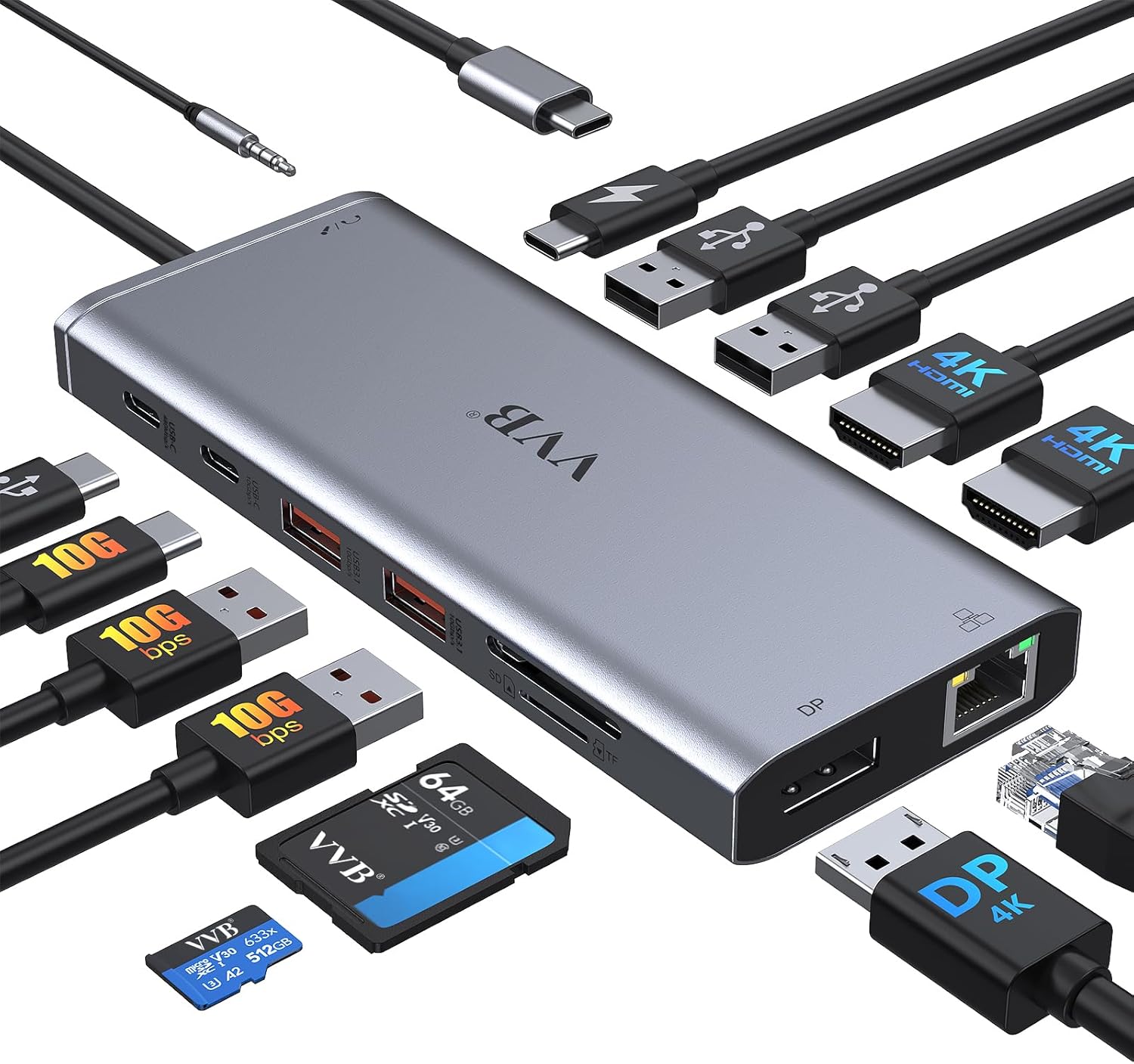
USB C Laptop Docking Station Dual Monitor HDMI USB C Hub Multiport Adapter

Dell SD25TB4 Pro Thunderbolt 4 Smart Dock - Supports 8k Display, 3 Years Warranty with 180W Adapter, HDMI, DisplayPort, Thunderbolt Cable, Cloth - USB C Docking Station Hub with Accessories
Check the evidence
Included does not mean verified authentic. Flagged does not mean proven fake. These are analytical classifications.
Showing 3 illustrative excerpts, not the complete review set.
No funciona en todos los tv. Edit, tiene arreglo.
“Edit: pude solucionar la falla, hay un tema de incompatibilidad con hdr, si reinicias la configuración del tv y conectas la consola, cuando te pregunte si quieres activae hdr dile que no y ya queda funcionando, le subo de 3 a 4 estrellas. Lo compré para mi rog-ally z1e y me encontré con la sorpresa de que no todos los protocolos de hdmi son compatibles, entonces no funciona en mi tv principal, pero funciona en mi tv secundario y también en mi monitor, el tv donde no funciona es un lg7400,desafortunadamente lo quería para ese tv y me tocará buscar alternativas y esta vez fijarme en las versiones con las que es compatible. Entonces no es un mal producto, pero es importante fijarse que sirva.”
Signals matched: Specific detail: entity, process, scenario · Reads as an authentic voice
Great product, but I think my unit is defective
“I love the dock, is built solid, but I think I have a mess up unit because I'm using the cable that came with it plus a high quality HDMI with my Toshiba fire TV (4k) the picture is amazing but the sound only comes out of the legion go and not the TV. So after some great costumer services and another unit received, is working like a charm, if you planning on getting it be aware of some units might be flawed but they'll replace it. But if from the beginning works then is a must buy”
Signals matched: Specific detail: entity, scenario, process · Reads as an authentic voice
Ehhh its okay
“I mean its okayyyy its DEFINITELY better than the one i bought before but its tough and finky ive had to bypass it i have to unplug replug things together and just its okayyy the chord it came with slow charged the whole bank like what? The original i have and it came with my Xbox Rog Ally is better so thank god for that”
Signals matched: Specific detail: comparison, process, entity · Reads as an authentic voice
One less thing to search
It's built for ROG Xbox Ally X (2025), ROG Ally/Ally X, Steam Deck LCD/OLED, and Legion Go, so most current handhelds are covered. One heads-up many YouTube reviewers mention: update the dock's firmware first — it prevents HDMI mirroring issues and unlocks proper extended-display performance. The product page links a short video guide that walks you through it in a few minutes.
The dock supports up to 100W power delivery, but each handheld has its own cap: Steam Deck tops out around 45W, ROG Ally at 65W, and Legion Go at 85W. In practice, that means you'll get your device's maximum charging speed, not a bottleneck from the dock. Reddit users often flag this as the most misunderstood spec, so it's worth knowing before you buy.
Yes — the HDMI 2.1 port supports 4K@120Hz for smooth, high-refresh gaming on a compatible monitor or TV. For extended (non-mirrored) display, make sure the firmware is updated and your handheld's display settings are set to "extend." TikTok users frequently show off this dual-screen setup, and it's one of the dock's most-praised features once configured.
The dual-foldable stand is designed specifically so the rear panel stays clear of the handheld's vents, improving heat dissipation during long sessions — a detail Legion Go owners (whose devices run warm) tend to appreciate. It holds standard handheld thicknesses securely; just seat the device firmly in the stand before connecting cables. The included joystick caps are a nice bonus for protecting your sticks from scratches.
You're covered by a 24-month worry-free warranty, and the brand will replace a defective unit free of charge. If you hit compatibility or firmware snags, customer service is responsive — though a few buyers note initial replies can take a day or two, so patience helps. For peace of mind, confirm your handheld is on the compatibility list before ordering, and keep the packaging until you've tested the display output.
From a similar, more-reviewed product in this category: USB C Laptop Docking Station Dual Monitor HDMI USB C Hub Multiport Adapter
It is compatible with laptops that have a full-featured USB-C port supporting DisplayPort, charging, and data transfer, such as Thunderbolt 3/4/5 or USB-C 3.2 Gen 1/Gen 2 with Power Delivery and DisplayPort. Not all USB-C devices are compatible, and incompatible devices cannot use the HDMI, DP, or VGA ports.
It supports dual monitors and triple displays for Windows, with single HDMI 1 or DisplayPort up to 4K@60Hz and HDMI 2 up to 4K@30Hz. MacBook laptops only support the same image on external monitors.
Yes, it has a 100W USB-C Power Delivery port, but the safe power out is limited to 87W, and about 8W is allocated to the hub itself. A power charger and cable are not included, and at least a 65W adapter is recommended.
Experiences vary: one reviewer said it disconnects or does not work off and on and that the insides came apart, while another said bumping it can make the monitor go black for a second or two. Others reported it works well, including one who bought a second one.
One reviewer noted it gets a little warm, and the listing states the hub will heat up when it works, with 0℃–50℃ being the normal and reasonable range.
Answers are limited to the manufacturer's listing and the reviews we analysed. Questions those sources cannot support are not answered here.
Transparent by design