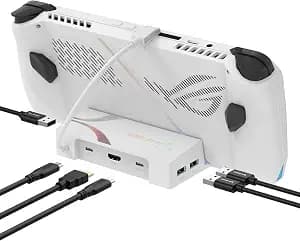
SABRENT Docking Station for Asus ROG Ally, 6-Port USB Type-C, 4K@60Hz HDMI, 5Gbps USB Ports, Power Delivery, Compact Design for Gaming (DS-RA6P)
Description
The Ultimate Docking Solution: The Sabrent USB Type-C 6-Port Docking Station (DS-RA6P) offers everything you need for the Asus ROG Ally and other portable devices, including USB ports, 4K HDMI output, and PD 3.0 power delivery.; 4K HDMI Display Output: Enjoy gaming, work, or media on a bigger screen with an HDMI 2.0 port that supports up to 4K@60Hz resolution and HDCP 1.4/2.2 compatibility for vivid visuals.; Versatile USB Connectivity: Expand your setup with three 5Gbps USB Type-A and one Type-C downstream ports, perfect for accessories like keyboards, mice, and external storage.; Powerful Charging Support: Keep your devices charged even in Turbo Mode with up to 95W power delivery (PD 3.0) via the USB Type-C input, ensuring uninterrupted performance.; Compact and Durable Design: Built for portability and stability, the docking station is perfect for desks or travel, making it the ideal companion for gaming, work, and entertainment.
Compare the trade-offs
Similar products, side by side
A random selection of analyzed products from the same category. Different products are not necessarily interchangeable.

Acer 13-in-1 Laptop Docking Station, USB-C 3 Display Docking (2 HDMI+1 DP)

UGREEN USB C Hub 5 in 1 Multiport Adapter Revodok 105 4K HDMI, 100W Power Delivery, 3 USB-A Data Ports, USB C Dongle for MacBook Pro/Air, iPad Pro, iMac, iPhone 16 Pro/Pro Max, XPS, Thinkpad

Mac mini M6, M5 Pro, M4 Dock with 8TB M.2 NVMe SSD Enclosure
One less thing to search
Before you buy: quick questions
Ist die Sabrent DS-RA6P-Dockingstation mit anderen Geräten als dem Asus ROG Ally kompatibel, wie z. B. dem Steam Deck?
Absolut. Obwohl sie mit Blick auf das Formfaktor des ROG Ally entwickelt wurde, handelt es sich hierbei um einen standardmäßigen USB-C-Hub. Er funktioniert einwandfrei mit dem Steam Deck, Lenovo Legion Go, Laptops, Tablets und jedem USB-C-Gerät, das DisplayPort Alt Mode unterstützt. Viele Nutzer auf Reddit bestätigen die nahtlose Nutzung mit ihren Steam Decks für TV-Docking.
Lädt es den ROG Ally während intensiver Spiele zuverlässig mit voller Geschwindigkeit?
Für die überwiegende Mehrheit der Benutzer ja – der 30W Power Delivery-Durchgang reicht aus, um den Ally auch unter Last zu laden. Allerdings erwähnen eine kleine Anzahl von Bewertungen gelegentliche Stromaushandlungsprobleme, bei denen sich der Ally bei sehr anspruchsvollen Spielen langsam entladen kann. Um eine konsistente Leistung zu gewährleisten, ist es am besten, das originale 65W-Netzteil des Ally (oder ein gleichwertiges hochwertiges) mit dem Dock zu verwenden.
Was ist nicht im Lieferumfang enthalten und wie ist die Verarbeitungsqualität?
Im Lieferumfang ist nur das Dock selbst enthalten; Sie müssen Ihre eigenen HDMI- und USB-C-Netzteil-Kabel bereitstellen. Was die Verarbeitung betrifft, wird es für sein kompaktes, solides Gefühl gelobt. Es handelt sich um eine hochwertige Plastikhülle, die schwer genug ist, um auf Ihrem Schreibtisch stabil zu stehen, und wie viele YouTube-Rezensenten anmerken, sieht und fühlt es sich viel hochwertiger an, als seine geringe Größe vermuten lässt.
Ich habe Kommentare zu HDMI-Problemen gesehen. Wird dies 4K mit 60 Hz auf meinen Monitor ausgeben?
Es ist für 4K@60Hz-Ausgabe zertifiziert, und die meisten Benutzer haben damit keine Probleme. Die gemeldeten Probleme betreffen typischerweise bestimmte Monitor-/TV-Marken und HDMI-Handshaking. Wenn Sie auf Probleme stoßen, ist eine häufig gelobte Lösung in Community-Foren, Ihren Monitor und Ihr Dock in einer bestimmten Reihenfolge einzuschalten oder ein anderes High-Speed-HDMI-Kabel auszuprobieren. Der Support von Sabrent ist auch dafür bekannt, bei der Fehlerbehebung in diesen Szenarien hilfreich zu sein.
Für wen ist dieses Dock am besten geeignet, und wer sollte sich nach Alternativen umsehen?
Dieses Dock ist ideal für den mobilen Spieler, der einen tragbaren, zuverlässigen und eleganten Hub zum Anschließen an einen Fernseher, Hinzufügen von Maus/Tastatur und Nutzung von kabelgebundenem Internet sucht. Wenn Ihre Anforderungen einfach sind, ist es eine fantastische Wahl. Power-User, die einen SD-Kartenleser, einen zusätzlichen SSD-Steckplatz oder weiter auseinander liegende USB-Anschlüsse für mehrere große Adapter benötigen, bevorzugen möglicherweise Alternativen wie bestimmte JSAUX- oder Anker-Modelle. Für die meisten ROG Ally-Besitzer, die eine saubere Docking-Lösung wünschen, ist dies eine hoch bewertete Wahl.
From a similar, more-reviewed product in this category: USB C Laptop Docking Station Dual Monitor HDMI USB C Hub Multiport Adapter
Will this docking station work with my laptop?
It is compatible with laptops that have a full-featured USB-C port supporting DisplayPort, charging, and data transfer, such as Thunderbolt 3/4/5 or USB-C 3.2 Gen 1/Gen 2 with Power Delivery and DisplayPort. Not all USB-C devices are compatible, and incompatible devices cannot use the HDMI, DP, or VGA ports.
Can I use it with multiple monitors?
It supports dual monitors and triple displays for Windows, with single HDMI 1 or DisplayPort up to 4K@60Hz and HDMI 2 up to 4K@30Hz. MacBook laptops only support the same image on external monitors.
Does it charge my laptop while I use the other ports?
Yes, it has a 100W USB-C Power Delivery port, but the safe power out is limited to 87W, and about 8W is allocated to the hub itself. A power charger and cable are not included, and at least a 65W adapter is recommended.
Do reviewers find it reliable?
Experiences vary: one reviewer said it disconnects or does not work off and on and that the insides came apart, while another said bumping it can make the monitor go black for a second or two. Others reported it works well, including one who bought a second one.
Does it get hot during use?
One reviewer noted it gets a little warm, and the listing states the hub will heat up when it works, with 0℃–50℃ being the normal and reasonable range.
Answers are limited to the manufacturer's listing and the reviews we analysed. Questions those sources cannot support are not answered here.
Transparent by design